[script] Highlight Inactive Employees in any company
-
Thread created on 23:33:01 - 02/05/26 (5 months ago)|Last replied 10:16:05 - 04/05/26 (5 months ago)
Highlight Inactive Employees
I put together a small userscript that makes it much easier to spot inactive employees in any company roster.
https://greasyfork.org/en/scripts/571442-torn-highlight-inactive-employees
The script checks company employees with your Limited API key and automatically highlights anyone who has been inactive for more than 72 hours. (you can change that in code easily if you want)
What it does:
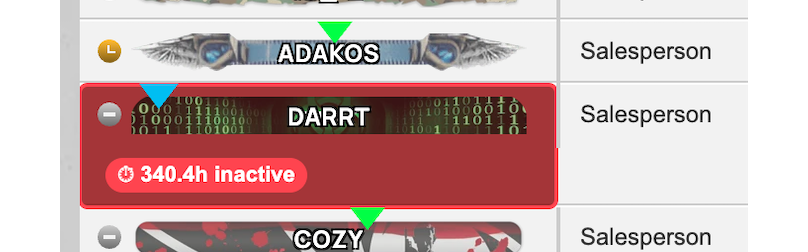
- Highlights inactive employees in red
- Adds a small badge showing how many hours they have been inactive
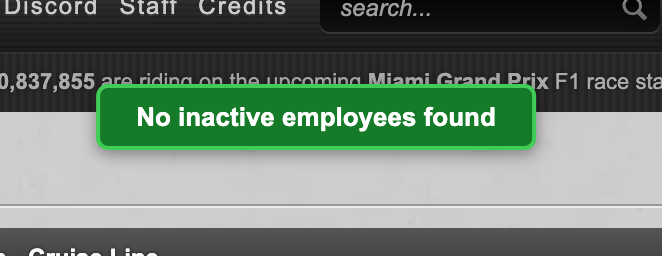
- Shows a confirmation banner when no inactive employees are found
- Stores your API key locally so you only need to enter it once
Example - inactive employee highlighted:
Example - no inactive employees found:
How to use it:
- Install Tampermonkey or a similar userscript manager
- Add the script
- Open your company employee page
- Enter your Limited API key the first time it runs
- This script is meant for joblist.php
- It uses a Limited API key, so it only needs basic access
- The key is saved locally in your userscript manager storage
https://greasyfork.org/en/scripts/571442-torn-highlight-inactive-employees
Last edited by Crognell on 23:23:58 - 04/05/26 (4 months ago) -
-
Posted on 10:16:05 - 04/05/26 (5 months ago)Post link copied to clipboard Copy post link
Sorry the script URL didn’t get pasted
https://greasyfork.org/en/scripts/571442-torn-highlight-inactive-employees
-

![Crognell [3208324]](/images/honors/230/h.png)