
![sercann [4141121]](/images/honors/125/h.png)

![Xeno2 [2387244]](/images/honors/328/h.png)
I didn't see any .hasFocus() in your code. You should be aware that any type of alert that comes from scaping an unfocused page is not allowed.
[SCRIPT PDA+WEB] Better Faction Chat (Live Status, @Mentions, True TCT, Travel Icons and etc.)
-
Thread created on 02:40:38 - 01/04/26 (7 months ago)|Last replied 07:32:51 - 04/11/26 (7 hours ago)
⚡ Better Faction Chat ⚡
The Ultimate Overhaul for Torn's Faction Chat
⚠️ [WARNING] BETA PHASE
This script is in the BETA phase and may contain bugs. I originally created this plugin for my own use but I’ve decided to continue developing it with community support. Thank you for your understanding.
Hey everyone,
Faction chat is the heart of Torn, but the default UI is missing some serious quality-of-life features. Over the past while, I've been developing and refining a script to completely overhaul the Faction Chat experience. It is 100% compatible with Torn's new React UI, highly optimized to prevent lag, and fixes the annoying scrolling bugs found in older chat scripts.✨ Key Features
⌚ Visible Timestamps
We've made message timestamps far more accessible and prominent. Instead of hiding them behind tooltips or making them hard to read, exact TCT times are elegantly displayed right next to every message for quick, at-a-glance reading.🟢 Live Player Status
Adds a clean Online (Green), Idle (Yellow), or Offline (Grey) dot next to the sender's name.✈️ State Icons
Instantly see if a faction mate is traveling (🌍), in the hospital (🏥), or in jail (⛓️) directly in the chat without having to click their profile.🔔 Smart @Mention System
When someone mentions your name, stand out more easily with customizable, glowing text.
Note: Includes a custom deduping memory system, so you won't get spammed with repeated alerts when scrolling up and down the chat!🔍 Built-in Chat Search
Easily search for specific messages or keywords within the loaded chat using a sleek search bar.📋 Clean Copy Button
Hover over any message to reveal a sleek "Copy" icon. It copies only the message text, ignoring the timestamp and username.⚙️ Highly Customizable UI
A dedicated settings panel (gear icon in the bottom left) lets you toggle features, adjust the volume, and change the UI colors to match your personal Torn theme.⚔️ Faction Rank Icons
Instantly recognize faction leadership! Faction positions are now displayed as sleek icons next to players' names, with unique icons for the Leader (👑) and Co-leaders (⭐).📸 Screenshots

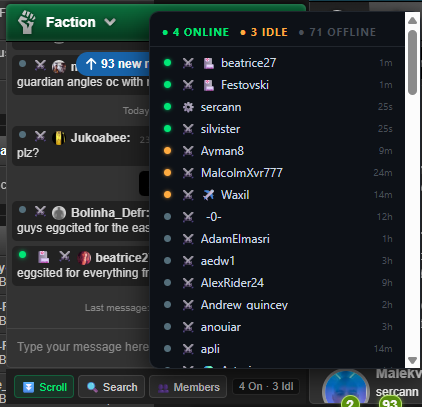
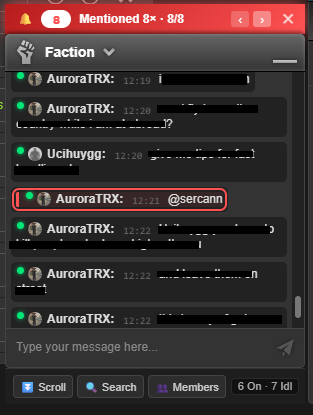
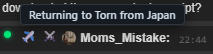
🛠️ Installation & Setup
- Make sure you have a user script manager installed like Tampermonkey or Violentmonkey.
- Click Here to install from GreasyFork
- Refresh Torn. You will see a new ⚙️ gear icon in the bottom left corner of your screen.
- Click it to open the settings panel, input your API key, and customize your experience.
🔒 Note on the API Key: The script requires a Limited Access API Key. Why? It only uses this to securely fetch the/faction/?selections=basicdata (to display the online/offline dots and travel icons) and to ping/user/?selections=basiconce to automatically detect your username for the @mention system. Your key never leaves your browser.💊 Buy Me a Coffee (Or a Xanax!)
If you enjoy using this script and want to show some support, donations in the form of Xanax, EDVDs, or cash are highly appreciated! It keeps the energy up for future updates and helps me stay focused.
Send a Tip to sercann [4141121]💻 Need Coding Help?I am also available to help the community with any script ideas, custom programming requests, or coding issues you might be struggling with. Feel free to reach out to me in-game or drop a message here. I'm always happy to help!
🔄 Version Changes
- v1.4 - Added @Mention autocomplete, some bug fixes and improve PDA optimization.
- v1.3.1 - Added faction rank icons and hide settings feature.
- v1.1 - Audio beep and OS/Browser notification features for Mention have been completely removed.
🥚 Check out my other work!
Getting ready for Easter? Don't miss my completely free, lag-proof Ultimate Easter Egg Hunter script with 300+ custom pages and smart detection.
👉 Click here to view the Ultimate Easter Egg HunterDeveloped with ❤️ by sercann [4141121]
Last edited by sercann on 22:44:54 - 04/04/26 (6 months ago) -
-
Posted on 02:43:04 - 01/04/26 (7 months ago)Post link copied to clipboard Copy post link
Torn's new chat uses a memory-saving technique called "Virtual Scrolling". This means older messages are physically removed from the page's code when they are off-screen, and only rendered when you scroll to them. Because of this, there are two behaviors you should know about how the script operates:
-
@Mentions: The script cannot scan your unloaded, past chat history for mentions when you first log in. However, it acts as the perfect radar while your chat is actively open. If you are AFK, working on another monitor, or have Torn in the background, it will catch every new incoming mention live and notify you instantly.
-
Search System: Similarly, the search tool can only find messages that have been loaded into the script's memory cache. If you are looking for a past message, simply type your keyword into the search bar and start scrolling up. The script remembers your search term and will dynamically highlight matches step-by-step as Torn loads the older chat history!
Last edited by sercann on 02:58:49 - 01/04/26 (7 months ago) -
-
Posted on 07:51:53 - 01/04/26 (7 months ago)Post link copied to clipboard Copy post link
I didn't see any .hasFocus() in your code. You should be aware that any type of alert that comes from scaping an unfocused page is not allowed.
Last edited by Xeno2 on 07:54:54 - 01/04/26 (7 months ago) -
-
Posted on 12:42:26 - 01/04/26 (7 months ago)Post link copied to clipboard Copy post link
Hey, thank you for that. I’m new here, so I didn’t know that. I just added a .hasFocus() check to all notification and alert systems.
Last edited by sercann on 12:43:33 - 01/04/26 (7 months ago) -
-
Posted on 12:56:11 - 01/04/26 (7 months ago)Post link copied to clipboard Copy post link
It's a very literal part of the rules, being new isn't an excuse for that.
Such software must not make additional non-API requests to Torn, scrape pages that are not currently being viewed, attempt to bypass CAPTCHA protections, or extract data from unfocused pages to send elsewhere, generate alerts, or draw attention to itself or another window.
-
-
Posted on 13:20:16 - 01/04/26 (7 months ago)Post link copied to clipboard Copy post link
📜 Patch Notes (v1.1 Update)
-
[Removed] Audio & Browser Notifications: To ensure strict compliance with Torn's scripting rules (which prohibit scripts from generating alerts, making non-API requests, or drawing attention to an unfocused window), the audio beep and OS/browser notification features for
@mentionshave been completely removed. -
[Updated] Settings Menu: The volume slider, sound toggle, and browser notification toggles have been cleanly removed from the settings panel to reflect these changes.
- Topic images are updated with new ones.
Last edited by sercann on 20:36:23 - 01/04/26 (7 months ago) -
-
Posted on 20:34:14 - 01/04/26 (7 months ago)Post link copied to clipboard Copy post link
📜 Patch Notes (v1.3.1 Update)
-
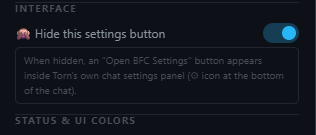
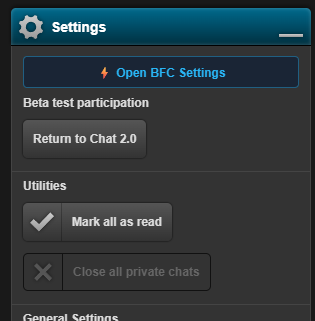
[Added] Hide Settings Button: Added a new option to hide the floating BFC gear icon from your screen for a cleaner UI. If you choose to hide it, you can easily access your BFC settings again by opening Torn's default chat settings (the small gear icon at the very bottom of the chat window), where a new "⚡ Open BFC Settings" button will seamlessly appear.
-
[Added] Faction Rank Icons: Faction positions are now displayed as sleek little icons next to players' names in the chat. The Leader and Co-leaders have unique icons (👑 and ⭐), ensuring you can always spot faction leadership at a glance!

 Last edited by sercann on 20:35:50 - 01/04/26 (7 months ago)
 -
-
Posted on 20:58:32 - 01/04/26 (7 months ago)Post link copied to clipboard Copy post link
Perfectooo. 🚑🚑🚒🚒🧘
-
-
Posted on 21:16:12 - 01/04/26 (7 months ago)Post link copied to clipboard Copy post link
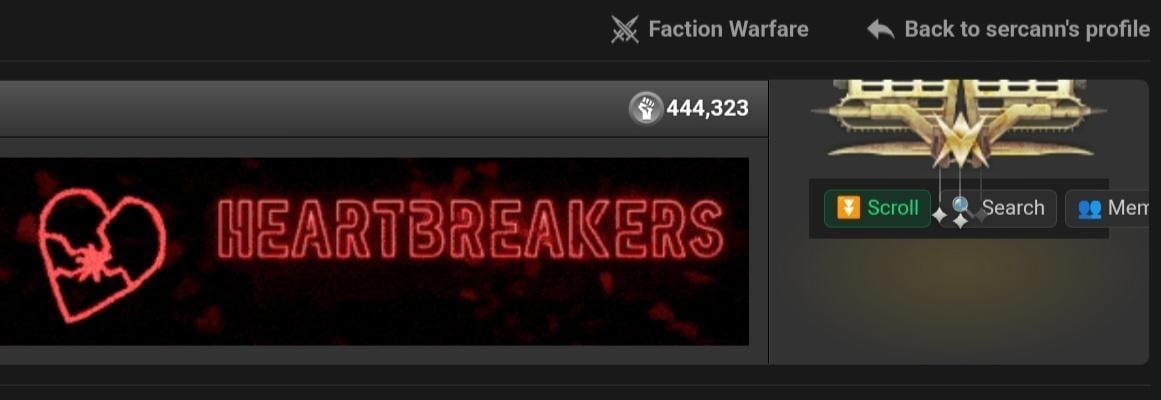
Hey just a heads up. The chat buttons appear on the faction war rank.
-
-
Posted on 21:38:48 - 01/04/26 (7 months ago)Post link copied to clipboard Copy post link
Fixed, you can just update the script. Thanks for the feedback!
-
-
Posted on 23:34:03 - 01/04/26 (7 months ago)Post link copied to clipboard Copy post link
📜 Patch Notes (v1.4 Update)
-
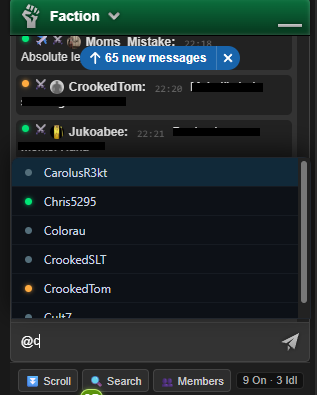
[Added] Smart @Mention Autocomplete: Tagging your faction mates is now easier than ever! Typing
@in the chat will instantly open a smart, clickable suggestion list of your faction members. Say goodbye to typos!
-
[Improved] Torn PDA & Mobile Optimization: The chat icons (status, rank, travel) are now fully optimized for touch screens with better spacing. The issue where icons were unclickable on mobile has been completely resolved. Tapping an icon on your phone will now seamlessly display its details.
-
[Fixed] Bug-Free & Enhanced Tooltips: The clunky default Torn timestamp tooltips that used to block your screen and overlap messages have been completely wiped out. They are replaced by our own high-quality, bug-free, and sleek custom info boxes for a much smoother experience!
-
-
Posted on 01:48:29 - 02/04/26 (7 months ago)Post link copied to clipboard Copy post link
Topic theme is update to modern one.
-
-
Posted on 03:53:57 - 02/04/26 (7 months ago)Post link copied to clipboard Copy post link
Mention Autocomplete is awesome 👏👏
-
-
Posted on 05:45:55 - 02/04/26 (7 months ago)Post link copied to clipboard Copy post link
Decided to try this out however the settings don't appear to be working/saving for me.
Key provided doesn't detect username, and changes to other settings aren't being saved.
This is on PDA.
-
-
Posted on 14:20:54 - 02/04/26 (7 months ago)Post link copied to clipboard Copy post link
After pasting ur API, you need to use "Save Settings" button bottom of the menu or whenever u changed something. You can close - open the faction chat for reload. Updating the API may take up to 1 minute.
Last edited by sercann on 14:22:09 - 02/04/26 (7 months ago) -
-
Posted on 16:05:41 - 02/04/26 (7 months ago)Post link copied to clipboard Copy post link
This seems much helpful. Good one mate.
-
-
Posted on 17:24:43 - 02/04/26 (7 months ago)Post link copied to clipboard Copy post link
Yeah tried this multiple times with different keys. The API pairing just doesn't work for me on PDA.
-
-
Posted on 17:41:27 - 02/04/26 (7 months ago)Post link copied to clipboard Copy post link
Update v1.4.2
-
Link List Optimization: As correctly pointed out, eggs only spawn on main
.phppages and not on every single randomloader.phpbackground request or specific sub-tab (#). Because of this, I have completely cleaned and purged the navigation list of these unnecessary duplicate links. The script now features a highly optimized list of unique pages, making your runs much faster and more efficient. -
Menu Auto-Scroll Fix: Disabled the auto-scrolling behavior inside the script's navigation panel. The list will no longer annoyingly jump or snap to the active page every time you hit "Next Page", keeping your menu view steady exactly where you left it.
-
-
Posted on 17:42:19 - 02/04/26 (7 months ago)Post link copied to clipboard Copy post link
I'm gonna check it.
-
-
Posted on 07:28:39 - 05/04/26 (6 months ago)Post link copied to clipboard Copy post link
Noticing a bug. I've had someone mention me in faction chat. After I've cleared the notification for it, it seems to come back even after I close the red box.
-

![DeKleineKobini [2114440]](/images/honors/700/h.png)


![MiiLKY [1481277]](/images/honors/839/h.png)

![A_To_Z [3552276]](/images/honors/280/h.png)

![Creature [2349024]](/images/honors/34/h.png)