I remember this, it's great for directors and trading
R+
Doesn't seem to have PDA support (settings are there and you can create buttons on PDA) but the buttons don't actually appear on PDA
[Script+PDA] Torn Chat Buttons v2.5
Completely new model, reimagined from top-to-bottom
This is a continuation of the script originally created by Callz. Since Torn had originally made a change that broke his script, I've spent some time experimenting with it to find a way of making it work again. In that time, I've also completely overhauled the design significantly and added some much-needed QOL features.
Click here for the original forum post by Callz
Updated version here: https://greasyfork.org/en/scripts/488294-torn-com-enhanced-chat-buttons-v2
Key features:
As Callz said in his original post, this simplifies the process of sending messages in chat. It mostly revolves around trading and not having to stress over constantly tracking down a notepad somewhere with your copyable messages, but has a ton of other uses regardless of what your role is in Torn. A faction leader sending private chats to their members to remind them to stack for their chain/war, thank you messages, and more!
This script complies with all of Torn's rules in that it doesn't automate anything for the user or access any data from any external sources. Clicking a button simply pastes a pre-configured message into the chat area of the selected window, and nothing more.
Changes from the original version:
Setup

A few things to consider while using this..
Bump - just pushed out a massive update overhauling many features of the script
I remember this, it's great for directors and trading
R+
Doesn't seem to have PDA support (settings are there and you can create buttons on PDA) but the buttons don't actually appear on PDA

I remember this, it's great for directors and trading
R+
Doesn't seem to have PDA support (settings are there and you can create buttons on PDA) but the buttons don't actually appear on PDA
This is because the script is attached to the search bar element added by TornTools from what I've been able to find, which PDA doesn't have. I'm not great at DOM manipulation or mobile development so I haven't been able to figure out how to add it there, but if anyone wants to figure it out I'll add it to the script.
I remember this, it's great for directors and trading
R+
Doesn't seem to have PDA support (settings are there and you can create buttons on PDA) but the buttons don't actually appear on PDA
This is because the script is attached to the search bar element added by TornTools from what I've been able to find, which PDA doesn't have. I'm not great at DOM manipulation or mobile development so I haven't been able to figure out how to add it there, but if anyone wants to figure it out I'll add it to the script.
No rush, and it doesn't detract on the quality of the script or the usefulness it provides, just a wishlist more than anything.
Thanks again!

Just got an update and it works amazing on PDA now!
If I could R+ again, I would thank you!

Just got an update and it works amazing on PDA now!
If I could R+ again, I would thank you!
Just had to do some digging around on TT's Git to see how they added the search bar and it was pretty simple from there lmao
Modified the trade timer to work on PDA as well
🔥🔥🔥🔥
Completely new model, reimagined from top-to-bottom
This is a continuation of the script originally created by Callz. Since Torn had originally made a change that broke his script, I've spent some time experimenting with it to find a way of making it work again. In that time, I've also completely overhauled the design significantly and added some much-needed QOL features.
Click here for the original forum post by Callz
Updated version here: https://greasyfork.org/en/scripts/488294-torn-com-enhanced-chat-buttons-v2
Key features:
- Customizable Buttons: You can create and customize buttons to suit your needs. Add buttons for specific chat channels or situations, making it easy to send predefined messages quickly.
- Easy Configuration: The user-friendly interface lets you manage your chat buttons effortlessly. You can add, edit, or delete buttons with ease.
- Conditional Buttons: Buttons can be configured to appear only in specific chat conditions, such as Trade Chat, Hospital Chat, Faction Chat, Company Chat, Global Chat, or User Chat.
- Rich Text Support: You can include variables in your button text, such as {name}, which will be dynamically replaced with the name of the active chat, allowing for personalized messages.
As Callz said in his original post, this simplifies the process of sending messages in chat. It mostly revolves around trading and not having to stress over constantly tracking down a notepad somewhere with your copyable messages, but has a ton of other uses regardless of what your role is in Torn. A faction leader sending private chats to their members to remind them to stack for their chain/war, thank you messages, and more!
This script complies with all of Torn's rules in that it doesn't automate anything for the user or access any data from any external sources. Clicking a button simply pastes a pre-configured message into the chat area of the selected window, and nothing more.
Changes from the original version:
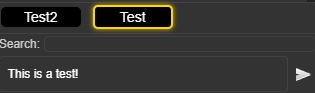
- Improved, clean UI: The buttons list is now in a tab of its own so you can see more than 2-3 buttons at a time. The height of the window will adjust according to how many buttons you've added for a compact design and you can even move the ordering of your buttons up and down, which will similarly change the order in which they appear in your chat windows.
- Reactive chat buttons: The content in your chatbox will always display only what you want to show by clicking on the relevant button, erasing any previously typed data to keep you safe from errors. You'll also see your most recently clicked button highlighted with yellow for ease of use. The button also reacts visually to you pressing it, just because I thought it'd look nice.
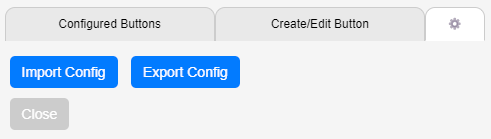
- Import/Export functionality: For easy use between devices or when you are clearing all of your browsing data and don't want to have to redo everything, you can now export your full button config and then import it in a couple easy steps through the integrated menu.
- Contextual buttons: Can't really show this one since the forums don't support videos or GIFs, but the buttons displayed under "Create/Edit Button" will change their titles according to whether you are adding a new button or editing an existing button. I found the previous implementation of these buttons confusing when I started out, so this was one of my first changes.
- Dynamic window sizing: The previous iteration of the script didn't work so well with different window sizes and could look quite messy on mobile. This one doesn't.
- Rich text support: Now you can use {faction} to automatically bring your most current faction data to the chat window, or {company} to do the same for your company, streamlining the recruitment process.
Setup
- Install the script from the link here
- Navigate to or refresh any page on Torn
- In the bottom right corner of your screen you will see a new button added with a stamp symbol. Click that.
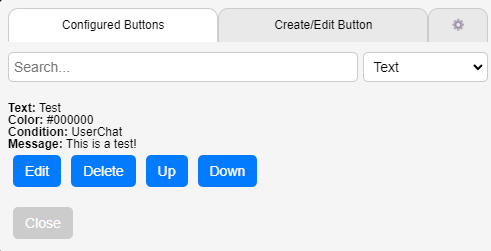
- It will open a new window over your screen. Configured buttons will show a list of all your buttons, create/edit button is where you can create or edit buttons along with the criteria for which they will appear, and the gear icon has a few tools some may find useful - such as exporting/importing your buttons, or adding an API key.
A few things to consider while using this..
- EVERYTHING is saved only in localstorage, nowhere else. So your data, including your API key, is all 100% safe.
- That being said - clearing localstorage will erase all of your buttons forcing you to redo them unless you backed them up using the export functionality.
- The API key is ONLY needed for the {faction} and {company} parameters for it to make the API call to get your faction or company info and autofill it for you.
- In the bottom right of the window as you type into the box when creating/editing a button, it will show a number. That number is how many characters are in your message - useful for knowing how close you are to Trade chats' limitations.
This is pretty slick, tbh!
There are probably a couple of things that stick out (for improvement), such as implementing a drop-down/foldout style menu, rather than having all buttons always visible (to allow for more buttons, without clumping up the screen).
It'd also be good to have the option of the content being added to existing content in the textbox, rather than completely replacing it. A specific example of this; if someone has a query in faction chat, then 9 or 10 other (unrelated) comments are made by others, it's often useful to start the comment with the name of the person you're directly responding to, so they know it's definitely relevant to them (with TornPDA or Torntools, this also highlights the comment for them). While I can obviously add the name after the comment has been pasted, it's a bit more awkward, especially on a phone.
Mostly just personal preference stuff, I guess, so take it or leave it. X-D
A quick question, though; I've just updated to the latest version and there's now an API key field but, there's no info about which one to use, or why?
Not all changes are for the better. #BeCarefulWhatYouWishFor
Completely new model, reimagined from top-to-bottom
This is a continuation of the script originally created by Callz. Since Torn had originally made a change that broke his script, I've spent some time experimenting with it to find a way of making it work again. In that time, I've also completely overhauled the design significantly and added some much-needed QOL features.
Click here for the original forum post by Callz
Updated version here: https://greasyfork.org/en/scripts/488294-torn-com-enhanced-chat-buttons-v2
Key features:
- Customizable Buttons: You can create and customize buttons to suit your needs. Add buttons for specific chat channels or situations, making it easy to send predefined messages quickly.
- Easy Configuration: The user-friendly interface lets you manage your chat buttons effortlessly. You can add, edit, or delete buttons with ease.
- Conditional Buttons: Buttons can be configured to appear only in specific chat conditions, such as Trade Chat, Hospital Chat, Faction Chat, Company Chat, Global Chat, or User Chat.
- Rich Text Support: You can include variables in your button text, such as {name}, which will be dynamically replaced with the name of the active chat, allowing for personalized messages.
As Callz said in his original post, this simplifies the process of sending messages in chat. It mostly revolves around trading and not having to stress over constantly tracking down a notepad somewhere with your copyable messages, but has a ton of other uses regardless of what your role is in Torn. A faction leader sending private chats to their members to remind them to stack for their chain/war, thank you messages, and more!
This script complies with all of Torn's rules in that it doesn't automate anything for the user or access any data from any external sources. Clicking a button simply pastes a pre-configured message into the chat area of the selected window, and nothing more.
Changes from the original version:
- Improved, clean UI: The buttons list is now in a tab of its own so you can see more than 2-3 buttons at a time. The height of the window will adjust according to how many buttons you've added for a compact design and you can even move the ordering of your buttons up and down, which will similarly change the order in which they appear in your chat windows.
- Reactive chat buttons: The content in your chatbox will always display only what you want to show by clicking on the relevant button, erasing any previously typed data to keep you safe from errors. You'll also see your most recently clicked button highlighted with yellow for ease of use. The button also reacts visually to you pressing it, just because I thought it'd look nice.
- Import/Export functionality: For easy use between devices or when you are clearing all of your browsing data and don't want to have to redo everything, you can now export your full button config and then import it in a couple easy steps through the integrated menu.
- Contextual buttons: Can't really show this one since the forums don't support videos or GIFs, but the buttons displayed under "Create/Edit Button" will change their titles according to whether you are adding a new button or editing an existing button. I found the previous implementation of these buttons confusing when I started out, so this was one of my first changes.
- Dynamic window sizing: The previous iteration of the script didn't work so well with different window sizes and could look quite messy on mobile. This one doesn't.
- Rich text support: Now you can use {faction} to automatically bring your most current faction data to the chat window, or {company} to do the same for your company, streamlining the recruitment process.
Setup
- Install the script from the link here
- Navigate to or refresh any page on Torn
- In the bottom right corner of your screen you will see a new button added with a stamp symbol. Click that.
- It will open a new window over your screen. Configured buttons will show a list of all your buttons, create/edit button is where you can create or edit buttons along with the criteria for which they will appear, and the gear icon has a few tools some may find useful - such as exporting/importing your buttons, or adding an API key.
A few things to consider while using this..
- EVERYTHING is saved only in localstorage, nowhere else. So your data, including your API key, is all 100% safe.
- That being said - clearing localstorage will erase all of your buttons forcing you to redo them unless you backed them up using the export functionality.
- The API key is ONLY needed for the {faction} and {company} parameters for it to make the API call to get your faction or company info and autofill it for you.
- In the bottom right of the window as you type into the box when creating/editing a button, it will show a number. That number is how many characters are in your message - useful for knowing how close you are to Trade chats' limitations.
I just downloaded the script and can't get it to work.

Completely new model, reimagined from top-to-bottom
This is a continuation of the script originally created by Callz. Since Torn had originally made a change that broke his script, I've spent some time experimenting with it to find a way of making it work again. In that time, I've also completely overhauled the design significantly and added some much-needed QOL features.
Click here for the original forum post by Callz
Updated version here: https://greasyfork.org/en/scripts/488294-torn-com-enhanced-chat-buttons-v2
Key features:
- Customizable Buttons: You can create and customize buttons to suit your needs. Add buttons for specific chat channels or situations, making it easy to send predefined messages quickly.
- Easy Configuration: The user-friendly interface lets you manage your chat buttons effortlessly. You can add, edit, or delete buttons with ease.
- Conditional Buttons: Buttons can be configured to appear only in specific chat conditions, such as Trade Chat, Hospital Chat, Faction Chat, Company Chat, Global Chat, or User Chat.
- Rich Text Support: You can include variables in your button text, such as {name}, which will be dynamically replaced with the name of the active chat, allowing for personalized messages.
As Callz said in his original post, this simplifies the process of sending messages in chat. It mostly revolves around trading and not having to stress over constantly tracking down a notepad somewhere with your copyable messages, but has a ton of other uses regardless of what your role is in Torn. A faction leader sending private chats to their members to remind them to stack for their chain/war, thank you messages, and more!
This script complies with all of Torn's rules in that it doesn't automate anything for the user or access any data from any external sources. Clicking a button simply pastes a pre-configured message into the chat area of the selected window, and nothing more.
Changes from the original version:
- Improved, clean UI: The buttons list is now in a tab of its own so you can see more than 2-3 buttons at a time. The height of the window will adjust according to how many buttons you've added for a compact design and you can even move the ordering of your buttons up and down, which will similarly change the order in which they appear in your chat windows.
- Reactive chat buttons: The content in your chatbox will always display only what you want to show by clicking on the relevant button, erasing any previously typed data to keep you safe from errors. You'll also see your most recently clicked button highlighted with yellow for ease of use. The button also reacts visually to you pressing it, just because I thought it'd look nice.
- Import/Export functionality: For easy use between devices or when you are clearing all of your browsing data and don't want to have to redo everything, you can now export your full button config and then import it in a couple easy steps through the integrated menu.
- Contextual buttons: Can't really show this one since the forums don't support videos or GIFs, but the buttons displayed under "Create/Edit Button" will change their titles according to whether you are adding a new button or editing an existing button. I found the previous implementation of these buttons confusing when I started out, so this was one of my first changes.
- Dynamic window sizing: The previous iteration of the script didn't work so well with different window sizes and could look quite messy on mobile. This one doesn't.
- Rich text support: Now you can use {faction} to automatically bring your most current faction data to the chat window, or {company} to do the same for your company, streamlining the recruitment process.
Setup
- Install the script from the link here
- Navigate to or refresh any page on Torn
- In the bottom right corner of your screen you will see a new button added with a stamp symbol. Click that.
- It will open a new window over your screen. Configured buttons will show a list of all your buttons, create/edit button is where you can create or edit buttons along with the criteria for which they will appear, and the gear icon has a few tools some may find useful - such as exporting/importing your buttons, or adding an API key.
A few things to consider while using this..
- EVERYTHING is saved only in localstorage, nowhere else. So your data, including your API key, is all 100% safe.
- That being said - clearing localstorage will erase all of your buttons forcing you to redo them unless you backed them up using the export functionality.
- The API key is ONLY needed for the {faction} and {company} parameters for it to make the API call to get your faction or company info and autofill it for you.
- In the bottom right of the window as you type into the box when creating/editing a button, it will show a number. That number is how many characters are in your message - useful for knowing how close you are to Trade chats' limitations.
This is pretty slick, tbh!
There are probably a couple of things that stick out (for improvement), such as implementing a drop-down/foldout style menu, rather than having all buttons always visible (to allow for more buttons, without clumping up the screen).
It'd also be good to have the option of the content being added to existing content in the textbox, rather than completely replacing it. A specific example of this; if someone has a query in faction chat, then 9 or 10 other (unrelated) comments are made by others, it's often useful to start the comment with the name of the person you're directly responding to, so they know it's definitely relevant to them (with TornPDA or Torntools, this also highlights the comment for them). While I can obviously add the name after the comment has been pasted, it's a bit more awkward, especially on a phone.
Mostly just personal preference stuff, I guess, so take it or leave it. X-D
A quick question, though; I've just updated to the latest version and there's now an API key field but, there's no info about which one to use, or why?
Only a public API key is needed. It's for if you want to use the {company} or {faction} rich text inputs, which will make an API call (only one per day, no matter how frequently you use that input) to retrieve your own company and faction information. Completely optional, the script will work fine without it, with the exception fo those two inputs.
Not too sure what you're trying to request about editing the existing chatbox content though. Feel free to send me a chat so that I can figure out what you're asking.
Completely new model, reimagined from top-to-bottom
This is a continuation of the script originally created by Callz. Since Torn had originally made a change that broke his script, I've spent some time experimenting with it to find a way of making it work again. In that time, I've also completely overhauled the design significantly and added some much-needed QOL features.
Click here for the original forum post by Callz
Updated version here: https://greasyfork.org/en/scripts/488294-torn-com-enhanced-chat-buttons-v2
Key features:
- Customizable Buttons: You can create and customize buttons to suit your needs. Add buttons for specific chat channels or situations, making it easy to send predefined messages quickly.
- Easy Configuration: The user-friendly interface lets you manage your chat buttons effortlessly. You can add, edit, or delete buttons with ease.
- Conditional Buttons: Buttons can be configured to appear only in specific chat conditions, such as Trade Chat, Hospital Chat, Faction Chat, Company Chat, Global Chat, or User Chat.
- Rich Text Support: You can include variables in your button text, such as {name}, which will be dynamically replaced with the name of the active chat, allowing for personalized messages.
As Callz said in his original post, this simplifies the process of sending messages in chat. It mostly revolves around trading and not having to stress over constantly tracking down a notepad somewhere with your copyable messages, but has a ton of other uses regardless of what your role is in Torn. A faction leader sending private chats to their members to remind them to stack for their chain/war, thank you messages, and more!
This script complies with all of Torn's rules in that it doesn't automate anything for the user or access any data from any external sources. Clicking a button simply pastes a pre-configured message into the chat area of the selected window, and nothing more.
Changes from the original version:
- Improved, clean UI: The buttons list is now in a tab of its own so you can see more than 2-3 buttons at a time. The height of the window will adjust according to how many buttons you've added for a compact design and you can even move the ordering of your buttons up and down, which will similarly change the order in which they appear in your chat windows.
- Reactive chat buttons: The content in your chatbox will always display only what you want to show by clicking on the relevant button, erasing any previously typed data to keep you safe from errors. You'll also see your most recently clicked button highlighted with yellow for ease of use. The button also reacts visually to you pressing it, just because I thought it'd look nice.
- Import/Export functionality: For easy use between devices or when you are clearing all of your browsing data and don't want to have to redo everything, you can now export your full button config and then import it in a couple easy steps through the integrated menu.
- Contextual buttons: Can't really show this one since the forums don't support videos or GIFs, but the buttons displayed under "Create/Edit Button" will change their titles according to whether you are adding a new button or editing an existing button. I found the previous implementation of these buttons confusing when I started out, so this was one of my first changes.
- Dynamic window sizing: The previous iteration of the script didn't work so well with different window sizes and could look quite messy on mobile. This one doesn't.
- Rich text support: Now you can use {faction} to automatically bring your most current faction data to the chat window, or {company} to do the same for your company, streamlining the recruitment process.
Setup
- Install the script from the link here
- Navigate to or refresh any page on Torn
- In the bottom right corner of your screen you will see a new button added with a stamp symbol. Click that.
- It will open a new window over your screen. Configured buttons will show a list of all your buttons, create/edit button is where you can create or edit buttons along with the criteria for which they will appear, and the gear icon has a few tools some may find useful - such as exporting/importing your buttons, or adding an API key.
A few things to consider while using this..
- EVERYTHING is saved only in localstorage, nowhere else. So your data, including your API key, is all 100% safe.
- That being said - clearing localstorage will erase all of your buttons forcing you to redo them unless you backed them up using the export functionality.
- The API key is ONLY needed for the {faction} and {company} parameters for it to make the API call to get your faction or company info and autofill it for you.
- In the bottom right of the window as you type into the box when creating/editing a button, it will show a number. That number is how many characters are in your message - useful for knowing how close you are to Trade chats' limitations.
I just downloaded the script and can't get it to work.
Need more information. What browser are you using, or are you on TornPDA? Have you made sure to install Tampermonkey/Greasemonkey?
Completely new model, reimagined from top-to-bottom
This is a continuation of the script originally created by Callz. Since Torn had originally made a change that broke his script, I've spent some time experimenting with it to find a way of making it work again. In that time, I've also completely overhauled the design significantly and added some much-needed QOL features.
Click here for the original forum post by Callz
Updated version here: https://greasyfork.org/en/scripts/488294-torn-com-enhanced-chat-buttons-v2
Key features:
- Customizable Buttons: You can create and customize buttons to suit your needs. Add buttons for specific chat channels or situations, making it easy to send predefined messages quickly.
- Easy Configuration: The user-friendly interface lets you manage your chat buttons effortlessly. You can add, edit, or delete buttons with ease.
- Conditional Buttons: Buttons can be configured to appear only in specific chat conditions, such as Trade Chat, Hospital Chat, Faction Chat, Company Chat, Global Chat, or User Chat.
- Rich Text Support: You can include variables in your button text, such as {name}, which will be dynamically replaced with the name of the active chat, allowing for personalized messages.
As Callz said in his original post, this simplifies the process of sending messages in chat. It mostly revolves around trading and not having to stress over constantly tracking down a notepad somewhere with your copyable messages, but has a ton of other uses regardless of what your role is in Torn. A faction leader sending private chats to their members to remind them to stack for their chain/war, thank you messages, and more!
This script complies with all of Torn's rules in that it doesn't automate anything for the user or access any data from any external sources. Clicking a button simply pastes a pre-configured message into the chat area of the selected window, and nothing more.
Changes from the original version:
- Improved, clean UI: The buttons list is now in a tab of its own so you can see more than 2-3 buttons at a time. The height of the window will adjust according to how many buttons you've added for a compact design and you can even move the ordering of your buttons up and down, which will similarly change the order in which they appear in your chat windows.
- Reactive chat buttons: The content in your chatbox will always display only what you want to show by clicking on the relevant button, erasing any previously typed data to keep you safe from errors. You'll also see your most recently clicked button highlighted with yellow for ease of use. The button also reacts visually to you pressing it, just because I thought it'd look nice.
- Import/Export functionality: For easy use between devices or when you are clearing all of your browsing data and don't want to have to redo everything, you can now export your full button config and then import it in a couple easy steps through the integrated menu.
- Contextual buttons: Can't really show this one since the forums don't support videos or GIFs, but the buttons displayed under "Create/Edit Button" will change their titles according to whether you are adding a new button or editing an existing button. I found the previous implementation of these buttons confusing when I started out, so this was one of my first changes.
- Dynamic window sizing: The previous iteration of the script didn't work so well with different window sizes and could look quite messy on mobile. This one doesn't.
- Rich text support: Now you can use {faction} to automatically bring your most current faction data to the chat window, or {company} to do the same for your company, streamlining the recruitment process.
Setup
- Install the script from the link here
- Navigate to or refresh any page on Torn
- In the bottom right corner of your screen you will see a new button added with a stamp symbol. Click that.
- It will open a new window over your screen. Configured buttons will show a list of all your buttons, create/edit button is where you can create or edit buttons along with the criteria for which they will appear, and the gear icon has a few tools some may find useful - such as exporting/importing your buttons, or adding an API key.
A few things to consider while using this..
- EVERYTHING is saved only in localstorage, nowhere else. So your data, including your API key, is all 100% safe.
- That being said - clearing localstorage will erase all of your buttons forcing you to redo them unless you backed them up using the export functionality.
- The API key is ONLY needed for the {faction} and {company} parameters for it to make the API call to get your faction or company info and autofill it for you.
- In the bottom right of the window as you type into the box when creating/editing a button, it will show a number. That number is how many characters are in your message - useful for knowing how close you are to Trade chats' limitations.
I just downloaded the script and can't get it to work.
Need more information. What browser are you using, or are you on TornPDA? Have you made sure to install Tampermonkey/Greasemonkey?
I use Torn PDA. I'm using the browser included in PDA. I don't have Tampermonkey/Greasemonkey installed because every other script I've used works in PDA without it.

Completely new model, reimagined from top-to-bottom
This is a continuation of the script originally created by Callz. Since Torn had originally made a change that broke his script, I've spent some time experimenting with it to find a way of making it work again. In that time, I've also completely overhauled the design significantly and added some much-needed QOL features.
Click here for the original forum post by Callz
Updated version here: https://greasyfork.org/en/scripts/488294-torn-com-enhanced-chat-buttons-v2
Key features:
- Customizable Buttons: You can create and customize buttons to suit your needs. Add buttons for specific chat channels or situations, making it easy to send predefined messages quickly.
- Easy Configuration: The user-friendly interface lets you manage your chat buttons effortlessly. You can add, edit, or delete buttons with ease.
- Conditional Buttons: Buttons can be configured to appear only in specific chat conditions, such as Trade Chat, Hospital Chat, Faction Chat, Company Chat, Global Chat, or User Chat.
- Rich Text Support: You can include variables in your button text, such as {name}, which will be dynamically replaced with the name of the active chat, allowing for personalized messages.
As Callz said in his original post, this simplifies the process of sending messages in chat. It mostly revolves around trading and not having to stress over constantly tracking down a notepad somewhere with your copyable messages, but has a ton of other uses regardless of what your role is in Torn. A faction leader sending private chats to their members to remind them to stack for their chain/war, thank you messages, and more!
This script complies with all of Torn's rules in that it doesn't automate anything for the user or access any data from any external sources. Clicking a button simply pastes a pre-configured message into the chat area of the selected window, and nothing more.
Changes from the original version:
- Improved, clean UI: The buttons list is now in a tab of its own so you can see more than 2-3 buttons at a time. The height of the window will adjust according to how many buttons you've added for a compact design and you can even move the ordering of your buttons up and down, which will similarly change the order in which they appear in your chat windows.
- Reactive chat buttons: The content in your chatbox will always display only what you want to show by clicking on the relevant button, erasing any previously typed data to keep you safe from errors. You'll also see your most recently clicked button highlighted with yellow for ease of use. The button also reacts visually to you pressing it, just because I thought it'd look nice.
- Import/Export functionality: For easy use between devices or when you are clearing all of your browsing data and don't want to have to redo everything, you can now export your full button config and then import it in a couple easy steps through the integrated menu.
- Contextual buttons: Can't really show this one since the forums don't support videos or GIFs, but the buttons displayed under "Create/Edit Button" will change their titles according to whether you are adding a new button or editing an existing button. I found the previous implementation of these buttons confusing when I started out, so this was one of my first changes.
- Dynamic window sizing: The previous iteration of the script didn't work so well with different window sizes and could look quite messy on mobile. This one doesn't.
- Rich text support: Now you can use {faction} to automatically bring your most current faction data to the chat window, or {company} to do the same for your company, streamlining the recruitment process.
Setup
- Install the script from the link here
- Navigate to or refresh any page on Torn
- In the bottom right corner of your screen you will see a new button added with a stamp symbol. Click that.
- It will open a new window over your screen. Configured buttons will show a list of all your buttons, create/edit button is where you can create or edit buttons along with the criteria for which they will appear, and the gear icon has a few tools some may find useful - such as exporting/importing your buttons, or adding an API key.
A few things to consider while using this..
- EVERYTHING is saved only in localstorage, nowhere else. So your data, including your API key, is all 100% safe.
- That being said - clearing localstorage will erase all of your buttons forcing you to redo them unless you backed them up using the export functionality.
- The API key is ONLY needed for the {faction} and {company} parameters for it to make the API call to get your faction or company info and autofill it for you.
- In the bottom right of the window as you type into the box when creating/editing a button, it will show a number. That number is how many characters are in your message - useful for knowing how close you are to Trade chats' limitations.
I just downloaded the script and can't get it to work.
Need more information. What browser are you using, or are you on TornPDA? Have you made sure to install Tampermonkey/Greasemonkey?
I use Torn PDA. I'm using the browser included in PDA. I don't have Tampermonkey/Greasemonkey installed because every other script I've used works in PDA without it.
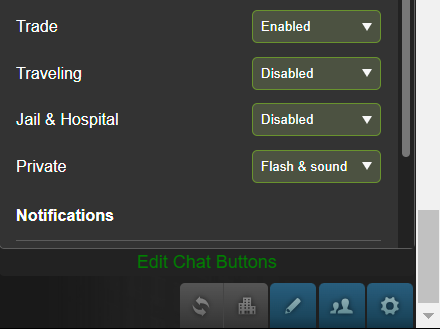
Should be working fine then. If you go tto the chat settings menu (gear icon in the bottom right), do you have a button at the bottom otf the pane that says "Edit Chat Buttons"?
Included a screenshot for clarity
Completely new model, reimagined from top-to-bottom
This is a continuation of the script originally created by Callz. Since Torn had originally made a change that broke his script, I've spent some time experimenting with it to find a way of making it work again. In that time, I've also completely overhauled the design significantly and added some much-needed QOL features.
Click here for the original forum post by Callz
Updated version here: https://greasyfork.org/en/scripts/488294-torn-com-enhanced-chat-buttons-v2
Key features:
- Customizable Buttons: You can create and customize buttons to suit your needs. Add buttons for specific chat channels or situations, making it easy to send predefined messages quickly.
- Easy Configuration: The user-friendly interface lets you manage your chat buttons effortlessly. You can add, edit, or delete buttons with ease.
- Conditional Buttons: Buttons can be configured to appear only in specific chat conditions, such as Trade Chat, Hospital Chat, Faction Chat, Company Chat, Global Chat, or User Chat.
- Rich Text Support: You can include variables in your button text, such as {name}, which will be dynamically replaced with the name of the active chat, allowing for personalized messages.
As Callz said in his original post, this simplifies the process of sending messages in chat. It mostly revolves around trading and not having to stress over constantly tracking down a notepad somewhere with your copyable messages, but has a ton of other uses regardless of what your role is in Torn. A faction leader sending private chats to their members to remind them to stack for their chain/war, thank you messages, and more!
This script complies with all of Torn's rules in that it doesn't automate anything for the user or access any data from any external sources. Clicking a button simply pastes a pre-configured message into the chat area of the selected window, and nothing more.
Changes from the original version:
- Improved, clean UI: The buttons list is now in a tab of its own so you can see more than 2-3 buttons at a time. The height of the window will adjust according to how many buttons you've added for a compact design and you can even move the ordering of your buttons up and down, which will similarly change the order in which they appear in your chat windows.
- Reactive chat buttons: The content in your chatbox will always display only what you want to show by clicking on the relevant button, erasing any previously typed data to keep you safe from errors. You'll also see your most recently clicked button highlighted with yellow for ease of use. The button also reacts visually to you pressing it, just because I thought it'd look nice.
- Import/Export functionality: For easy use between devices or when you are clearing all of your browsing data and don't want to have to redo everything, you can now export your full button config and then import it in a couple easy steps through the integrated menu.
- Contextual buttons: Can't really show this one since the forums don't support videos or GIFs, but the buttons displayed under "Create/Edit Button" will change their titles according to whether you are adding a new button or editing an existing button. I found the previous implementation of these buttons confusing when I started out, so this was one of my first changes.
- Dynamic window sizing: The previous iteration of the script didn't work so well with different window sizes and could look quite messy on mobile. This one doesn't.
- Rich text support: Now you can use {faction} to automatically bring your most current faction data to the chat window, or {company} to do the same for your company, streamlining the recruitment process.
Setup
- Install the script from the link here
- Navigate to or refresh any page on Torn
- In the bottom right corner of your screen you will see a new button added with a stamp symbol. Click that.
- It will open a new window over your screen. Configured buttons will show a list of all your buttons, create/edit button is where you can create or edit buttons along with the criteria for which they will appear, and the gear icon has a few tools some may find useful - such as exporting/importing your buttons, or adding an API key.
A few things to consider while using this..
- EVERYTHING is saved only in localstorage, nowhere else. So your data, including your API key, is all 100% safe.
- That being said - clearing localstorage will erase all of your buttons forcing you to redo them unless you backed them up using the export functionality.
- The API key is ONLY needed for the {faction} and {company} parameters for it to make the API call to get your faction or company info and autofill it for you.
- In the bottom right of the window as you type into the box when creating/editing a button, it will show a number. That number is how many characters are in your message - useful for knowing how close you are to Trade chats' limitations.
I just downloaded the script and can't get it to work.
Need more information. What browser are you using, or are you on TornPDA? Have you made sure to install Tampermonkey/Greasemonkey?
I use Torn PDA. I'm using the browser included in PDA. I don't have Tampermonkey/Greasemonkey installed because every other script I've used works in PDA without it.
Should be working fine then. If you go tto the chat settings menu (gear icon in the bottom right), do you have a button at the bottom otf the pane that says "Edit Chat Buttons"?
Included a screenshot for clarity
Found it. I wasn't looking for writing on the bottom of the panel. I was looking for an actual button, lol.
Sorry about that, my mistake.

Completely new model, reimagined from top-to-bottom
This is a continuation of the script originally created by Callz. Since Torn had originally made a change that broke his script, I've spent some time experimenting with it to find a way of making it work again. In that time, I've also completely overhauled the design significantly and added some much-needed QOL features.
Click here for the original forum post by Callz
Updated version here: https://greasyfork.org/en/scripts/488294-torn-com-enhanced-chat-buttons-v2
Key features:
- Customizable Buttons: You can create and customize buttons to suit your needs. Add buttons for specific chat channels or situations, making it easy to send predefined messages quickly.
- Easy Configuration: The user-friendly interface lets you manage your chat buttons effortlessly. You can add, edit, or delete buttons with ease.
- Conditional Buttons: Buttons can be configured to appear only in specific chat conditions, such as Trade Chat, Hospital Chat, Faction Chat, Company Chat, Global Chat, or User Chat.
- Rich Text Support: You can include variables in your button text, such as {name}, which will be dynamically replaced with the name of the active chat, allowing for personalized messages.
As Callz said in his original post, this simplifies the process of sending messages in chat. It mostly revolves around trading and not having to stress over constantly tracking down a notepad somewhere with your copyable messages, but has a ton of other uses regardless of what your role is in Torn. A faction leader sending private chats to their members to remind them to stack for their chain/war, thank you messages, and more!
This script complies with all of Torn's rules in that it doesn't automate anything for the user or access any data from any external sources. Clicking a button simply pastes a pre-configured message into the chat area of the selected window, and nothing more.
Changes from the original version:
- Improved, clean UI: The buttons list is now in a tab of its own so you can see more than 2-3 buttons at a time. The height of the window will adjust according to how many buttons you've added for a compact design and you can even move the ordering of your buttons up and down, which will similarly change the order in which they appear in your chat windows.
- Reactive chat buttons: The content in your chatbox will always display only what you want to show by clicking on the relevant button, erasing any previously typed data to keep you safe from errors. You'll also see your most recently clicked button highlighted with yellow for ease of use. The button also reacts visually to you pressing it, just because I thought it'd look nice.
- Import/Export functionality: For easy use between devices or when you are clearing all of your browsing data and don't want to have to redo everything, you can now export your full button config and then import it in a couple easy steps through the integrated menu.
- Contextual buttons: Can't really show this one since the forums don't support videos or GIFs, but the buttons displayed under "Create/Edit Button" will change their titles according to whether you are adding a new button or editing an existing button. I found the previous implementation of these buttons confusing when I started out, so this was one of my first changes.
- Dynamic window sizing: The previous iteration of the script didn't work so well with different window sizes and could look quite messy on mobile. This one doesn't.
- Rich text support: Now you can use {faction} to automatically bring your most current faction data to the chat window, or {company} to do the same for your company, streamlining the recruitment process.
Setup
- Install the script from the link here
- Navigate to or refresh any page on Torn
- In the bottom right corner of your screen you will see a new button added with a stamp symbol. Click that.
- It will open a new window over your screen. Configured buttons will show a list of all your buttons, create/edit button is where you can create or edit buttons along with the criteria for which they will appear, and the gear icon has a few tools some may find useful - such as exporting/importing your buttons, or adding an API key.
A few things to consider while using this..
- EVERYTHING is saved only in localstorage, nowhere else. So your data, including your API key, is all 100% safe.
- That being said - clearing localstorage will erase all of your buttons forcing you to redo them unless you backed them up using the export functionality.
- The API key is ONLY needed for the {faction} and {company} parameters for it to make the API call to get your faction or company info and autofill it for you.
- In the bottom right of the window as you type into the box when creating/editing a button, it will show a number. That number is how many characters are in your message - useful for knowing how close you are to Trade chats' limitations.
Having a slight problem. The script works on everything except Trade Chat. For some reason, the button isn't full height.
Any help is appreciated.

Completely new model, reimagined from top-to-bottom
This is a continuation of the script originally created by Callz. Since Torn had originally made a change that broke his script, I've spent some time experimenting with it to find a way of making it work again. In that time, I've also completely overhauled the design significantly and added some much-needed QOL features.
Click here for the original forum post by Callz
Updated version here: https://greasyfork.org/en/scripts/488294-torn-com-enhanced-chat-buttons-v2
Key features:
- Customizable Buttons: You can create and customize buttons to suit your needs. Add buttons for specific chat channels or situations, making it easy to send predefined messages quickly.
- Easy Configuration: The user-friendly interface lets you manage your chat buttons effortlessly. You can add, edit, or delete buttons with ease.
- Conditional Buttons: Buttons can be configured to appear only in specific chat conditions, such as Trade Chat, Hospital Chat, Faction Chat, Company Chat, Global Chat, or User Chat.
- Rich Text Support: You can include variables in your button text, such as {name}, which will be dynamically replaced with the name of the active chat, allowing for personalized messages.
As Callz said in his original post, this simplifies the process of sending messages in chat. It mostly revolves around trading and not having to stress over constantly tracking down a notepad somewhere with your copyable messages, but has a ton of other uses regardless of what your role is in Torn. A faction leader sending private chats to their members to remind them to stack for their chain/war, thank you messages, and more!
This script complies with all of Torn's rules in that it doesn't automate anything for the user or access any data from any external sources. Clicking a button simply pastes a pre-configured message into the chat area of the selected window, and nothing more.
Changes from the original version:
- Improved, clean UI: The buttons list is now in a tab of its own so you can see more than 2-3 buttons at a time. The height of the window will adjust according to how many buttons you've added for a compact design and you can even move the ordering of your buttons up and down, which will similarly change the order in which they appear in your chat windows.
- Reactive chat buttons: The content in your chatbox will always display only what you want to show by clicking on the relevant button, erasing any previously typed data to keep you safe from errors. You'll also see your most recently clicked button highlighted with yellow for ease of use. The button also reacts visually to you pressing it, just because I thought it'd look nice.
- Import/Export functionality: For easy use between devices or when you are clearing all of your browsing data and don't want to have to redo everything, you can now export your full button config and then import it in a couple easy steps through the integrated menu.
- Contextual buttons: Can't really show this one since the forums don't support videos or GIFs, but the buttons displayed under "Create/Edit Button" will change their titles according to whether you are adding a new button or editing an existing button. I found the previous implementation of these buttons confusing when I started out, so this was one of my first changes.
- Dynamic window sizing: The previous iteration of the script didn't work so well with different window sizes and could look quite messy on mobile. This one doesn't.
- Rich text support: Now you can use {faction} to automatically bring your most current faction data to the chat window, or {company} to do the same for your company, streamlining the recruitment process.
Setup
- Install the script from the link here
- Navigate to or refresh any page on Torn
- In the bottom right corner of your screen you will see a new button added with a stamp symbol. Click that.
- It will open a new window over your screen. Configured buttons will show a list of all your buttons, create/edit button is where you can create or edit buttons along with the criteria for which they will appear, and the gear icon has a few tools some may find useful - such as exporting/importing your buttons, or adding an API key.
A few things to consider while using this..
- EVERYTHING is saved only in localstorage, nowhere else. So your data, including your API key, is all 100% safe.
- That being said - clearing localstorage will erase all of your buttons forcing you to redo them unless you backed them up using the export functionality.
- The API key is ONLY needed for the {faction} and {company} parameters for it to make the API call to get your faction or company info and autofill it for you.
- In the bottom right of the window as you type into the box when creating/editing a button, it will show a number. That number is how many characters are in your message - useful for knowing how close you are to Trade chats' limitations.
Having a slight problem. The script works on everything except Trade Chat. For some reason, the button isn't full height.
Any help is appreciated.
Interesting. I'll have to be able to replicate the issue to fix it, so need the details like what browser you're using, zoom level, other extensions you're using, etc.
Is it constantly like that or does it appear normal at any point?
Does it appear that way even after disabling other extensions?
Interesting. I'll have to be able to replicate the issue to fix it, so need the details like what browser you're using, zoom level, other extensions you're using, etc.
Is it constantly like that or does it appear normal at any point?
Does it appear that way even after disabling other extensions?
It's constantly like that. I just disabled all scripts, reloaded the page, and got the same results.
I'm running PDA on an android, and the zoom level and everything else hasn't been adjusted. I'm running PDA just as it comes (except for various aftermarket scripts). Everything is up to date, as far as versions.
The interesting thing is, the button works normally. I just can't see it.

Interesting. I'll have to be able to replicate the issue to fix it, so need the details like what browser you're using, zoom level, other extensions you're using, etc.
Is it constantly like that or does it appear normal at any point?
Does it appear that way even after disabling other extensions?
It's constantly like that. I just disabled all scripts, reloaded the page, and got the same results.
I'm running PDA on an android, and the zoom level and everything else hasn't been adjusted. I'm running PDA just as it comes (except for various aftermarket scripts). Everything is up to date, as far as versions.
The interesting thing is, the button works normally. I just can't see it.
In order for PDA to update that you disabled all scripts you have to completely close it (by killing the app/task) and then load it back up, so go ahead and try doing that.
I'll do some testing on my own end but it's been problem free here. What phone model are you using specifically?
Interesting. I'll have to be able to replicate the issue to fix it, so need the details like what browser you're using, zoom level, other extensions you're using, etc.
Is it constantly like that or does it appear normal at any point?
Does it appear that way even after disabling other extensions?
It's constantly like that. I just disabled all scripts, reloaded the page, and got the same results.
I'm running PDA on an android, and the zoom level and everything else hasn't been adjusted. I'm running PDA just as it comes (except for various aftermarket scripts). Everything is up to date, as far as versions.
The interesting thing is, the button works normally. I just can't see it.
In order for PDA to update that you disabled all scripts you have to completely close it (by killing the app/task) and then load it back up, so go ahead and try doing that.
I'll do some testing on my own end but it's been problem free here. What phone model are you using specifically?
I'm using a Galaxy A14 5G. I just updated it on July 01, 2024.
I killed all my scripts, except for yours, closed PDA, and relaunched it. It looks exactly the same. there is no change.