
![Palisade [2536667]](/images/honors/533/h.png)

![Ata [2507441]](/images/honors/687/h.png)

![awsmn_ [2586798]](/images/honors/676/h.png)

![MarquisAurelius [2148698]](/images/honors/229/h.png)
![Pula [2397391]](/images/honors/110/h.png)
![ThatBlueSeed [2586618]](/images/honors/204/h.png)
![LadyTriffid [2531663]](/images/honors/478/h.png)

![TheEmpress [2299206]](/images/honors/322/h.png)
The Yata link didnt work for me
Beginners Guide to YATA [Last Update: Sept 29]
All screenshots below are from desktop Torn.com and only refer to mobile when the screenshots look similar between devices.
Complete guide to follow. Feel free to contribute.
Contents
I. Logging In o YATA
II. How to Log In
III. Bazaar Overview
IV. Stock Overview
V. Faction Overview
VI. Target Overview
VII. Target List Breakdown
VIII. Awards Breakdown
IX. Loot Breakdown
-----------------------------------------------
I. What is YATA?
YATA (Yet Another Torn App) is a great all-around tool for Torn users at any level of activity. It's an open-sourced website created and managed by Kivou[2000607] and is meant to act as a source of deeper information regarding your Torn account, and is widely used as an efficient Target List management tool for individuals, and Faction data manager for faction members and leaders.
There are links on YATA that are public and do not require you to log-in, however, the real power of YATA is found in its mentioned Target List and Faction data capabilities.
-----------------------------------------------
II. Logging In to YATA
To log in to YATA, you will first need your (super secret) Torn API Key. To find and use your API key, refer to the images below.
1. Select your profile icon in the top right. (Both mobile and PC applications look similar.)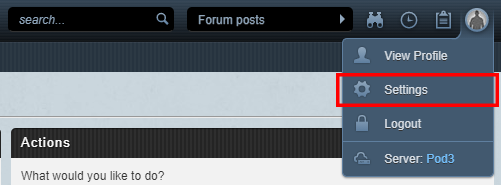
2. Copy your API key from your profile settings, and paste into YATA login box.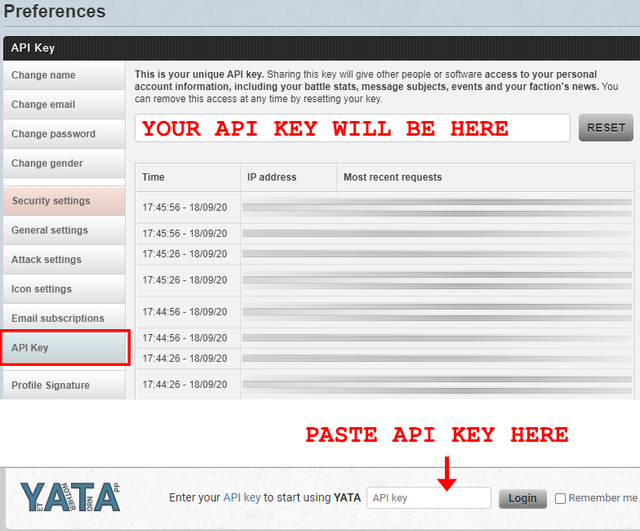
3. Select Login. You will now have access to everything YATA has to offer.
-----------------------------------------------
III. Bazaar Overview
The Bazaar tool is great for traders looking to make the most of their stock. It could also be one of the more daunting tabs to open on YATA since you're promptly served with a warm fustercluck slap to the teeth with numbers, colors, icons, and more numbers. But it's actually pretty simple.
Pro Tip: Hover over numbers and icons for a description of what they mean/do.
Here's a breakdown of what the information on an item means. We'll get into how to translate all this later on.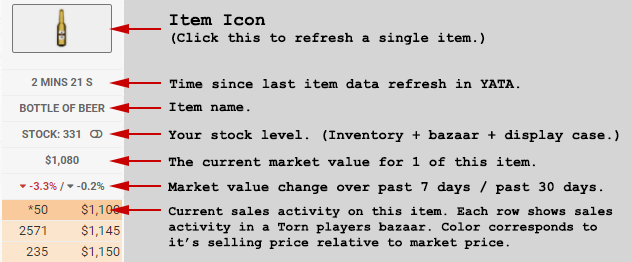
The color correlation for Torn Bazaars.
The switch icon beside your stock level will add the item to your Custom list, which can be accessed in the Bazaar submenu under 'Custom'.
Thanks to Trijikon for mentioning the grey boxes and Kivou for the clarification. Noted below, you'll notice that plushies and flowers have grey boxes in the Sales Activity feed. These are noting inventory of 4 and under and are there as a means of efficiency as flowers & plushies are typically purchased in bulk.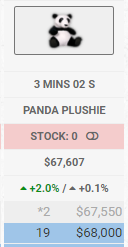
The Good, The Bad & The Risky
For the sake of comparison, I've got two images below to show you what you should be looking for if you're looking to trade items for an increase in profits... As well as some important notes to keep in mind when looking to make a profit off of the Torn marketplace. Just remember, what goes up, must come down. Eventually...
You can access these graphs by clicking on the Market Value Change number in YATA.
Market Value Over Time: Beer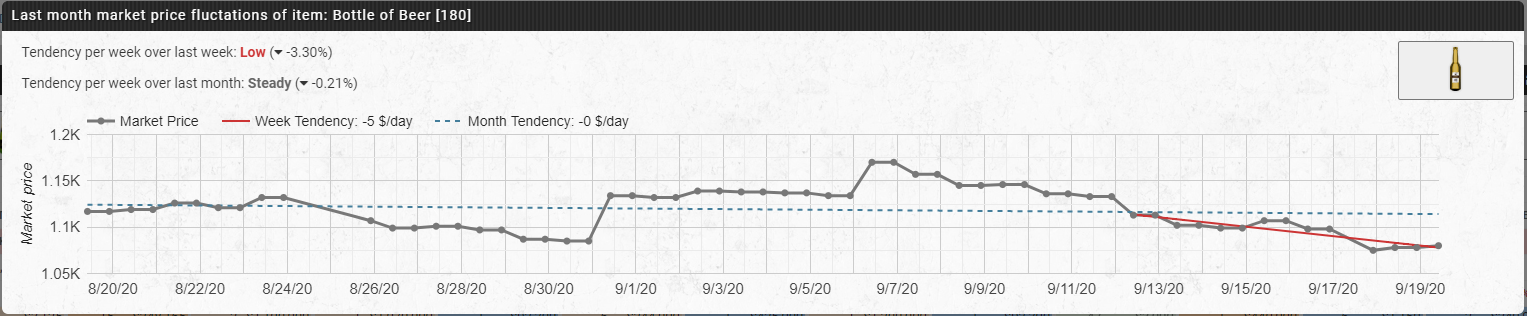
Market Value Over Time: Can of Goose Juice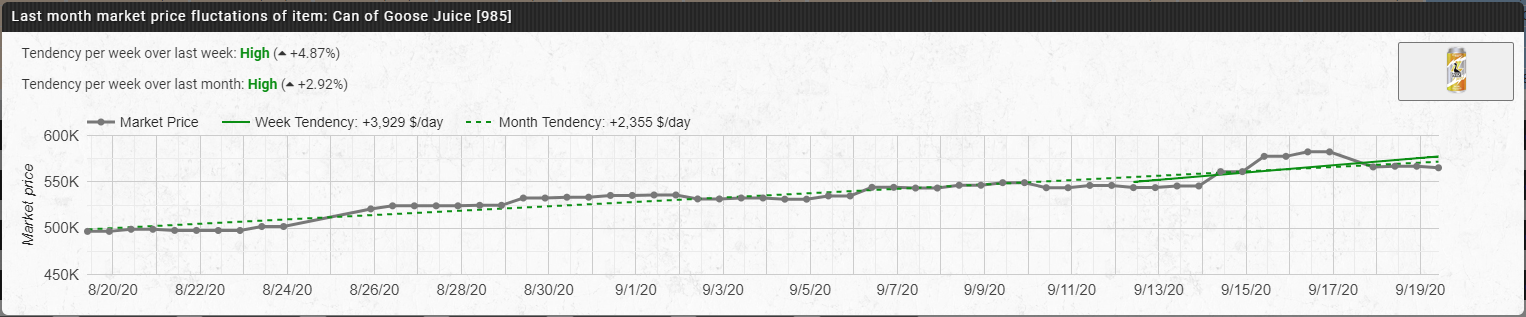
Remember!
At the time of writing this, the Eliminations 2020 event is occurring, so take that into account when you consider the trends of the items above... To put it simply; Beer is not in high demand at this time, so the market sees more stock in beer, thus the price is more competitive and goes down. Goose Juice, on the other hand, is used as an advantage during Eliminations, so it is in higher demand, and the price goes up.
Market Price
The market price (Grey Line) shown in the graphs above show the pattern of what people are paying for these items over time. It's important to note that these two items are on a different Y-axis scale in terms of price. So a small increase in Goose Juice is actually more $ than beer - but there's a reason I did this so bear with me.
Week Tendency
The week tendency (Short solid line) shows the average increase in price over the past 7 days. In basic terms, the steeper this line increases, the more it indicates a decent short-term return. Using the Goose Juice graph as an example, it's important to asses the Market Price line in this case, because at first glance it looks like a good time to sell Goose Juice as the weekly sales are on the upswing. However, the Market Price has decreased or remained relatively the same for the past 4 days. This could indicate a drop in price, so it could also become a good time to buy in the next few days.
Monthly Tendency
The monthly tendency (dotted line) is similar to the weekly tendency, except that it shows you the average increase over the past 30 days rather than 7. This could be used to gauge a long term investment, or help you decide to pull the trigger and sell items before they go lower if the fear of losing a lot of money is present in your inventory.
The Correlation
There are more tricks that real traders (not me) can teach you, but a good start is to compare the 7-day and 30-day trendlines. The steeper increase on the 7-day line vs. the 30-day tells me that the item is recently booming in price. Takeaway: not a good time to buy, but a good time to sell. Vice versa, if the 7-day trendline vs. the 30-day is steeply decreasing, it may be smart for me to buy or at least keep my eye on the price over the next couple days.
Top 10: Buy & Sell
Now that you've read above and can make correlations in the numbers on basic items, it's a good time to click on "Top 10" in the submenu of YATA (Must click Bazaar first). This page will give you the most polarized items in terms of changes, and the logic is basic Torn economics:
If the current selling price is below typical market price, buy.
If the current selling price is above typical market price, sell.
Thanks to YATA you don't need to do any math. If the items are on this page under the buy section, you can bet that they are at least safe bets to buy. Likewise, if you're sitting on a plethora of Cesium-137 like the sociopath you probably are since you've read this far, then a +21.4% increase to its selling price probably sounds damn good.
Pro Tip: Keep informed about Torn events. Events like Elimination will change the Buy/Sell market drastically on items such as Morphine, Blood Bags & Energy Drinks as well as services such as revives, mercenary work, etc.
-----------------------------------------------
IV. Stock Overview
[WIP] To contribute, post below.
-----------------------------------------------
V. Faction Overview
Faction Submenu Overview
The Faction tab is by far the most content and tool-heavy section on YATA. I may not cover everything, but I'll cover the things I know best at the moment as they'll be the more commonly used tools.
Below is the Faction submenu.
Chains
[Work In Progress]
If you are willing to share any chain screenshots of YATA data, please forward them to me. I'll censor sensitive information.
Attacks
Walls
Members
The members menu is a great tool for all members of a faction, especially large factions with very active users but there is one catch:
In order for your members information to show properly, they must use YATA.
In this window, you can view the typical information you can find on Torn, but the real power of the Members window is in the reveal of a members':
Energy | CE Rank | NNB | Stats
Energy is a good visual when chaining so that you can message members showing high energy remaining, or narrow down who may be using Faction Xanax to stack, but not contributing to chains. (Don't be that guy.)
CE Rank is your Crime Experience Rank. This number is relative to other members in your faction who use YATA, so if you're going to rely on this number, you should encourage your Faction members to use YATA. It uses your NNB (Natural Nerve Bar), Organized Crimes, and your Personal Crime count to determine this score among other members.
NNB (Natural Nerve Bar) is on the left side of this metric and is used when determining which members should team up together on Organized Crimes. EA (Equivalent Arsons) is Kivou's way of honoring Satan with a mathematical equation I don't even want to imagine. It basically compares your crime history and equates it to how many Warehouse Arson's you've completed (even if you haven't completed any).
Stats are simply the players total battle stats. You can hover over this for a breakdown of their stats.
Pro Tip: If you see a little green icon with a plus sign, click this to begin sharing that statistic with your faction. You can click on your own stat again if you want to stop sharing that specific column from being shared.
-----------------------------------------------
VI. Targets Overview
What is a Target?
A target is simply someone that you attack. More specifically, it should be someone that you are able to defeat with relative ease, depending on why you need to attack them.
While chaining, it may be necessary to have targets that you can one-hit or defeat without taking any damage. This will allow you to execute as many attacks as possible for your chain.
While farming respect, it makes more sense to attack enemies that aren't too easy as you won't gain as much respect from defeating them. There also may not be the same sense of urgency in quick attacks as there is with chaining.
YATA can help you visualize everything you need to make the decisions and execution of these attacks as easy as possible.
Finding Targets
Early on, it's important to know how to find targets. There are a couple methods that have always been helpful for me.
Using Advanced Search (Donator Status Required)
Early on, I joined an established Faction who had scheduled chains; so it was necessary to have a large Target List of enemies that were inactive, and simple to beat. Using advanced search, I was able to search thousands of inactive users that I could attack without fear of retaliation.
Be careful to assess the users profile before attacking, as they could be level holders. Attack potential targets before adding them to your list to ensure you can defeat them as you had hoped. A simple way to find users like this is to use the advanced search like this. The Level 0-10 range can be changed to fit your level.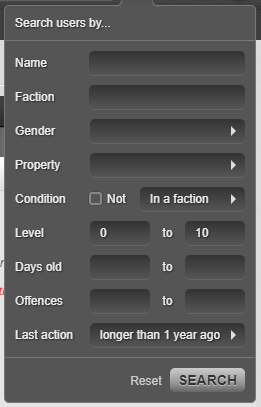
If you are not a donator, you can use the search function as best as you can to find inactive users, or ask fellow faction members for old targets of theirs. At some point we will all outgrow our targets and leave them on the side of the road like the sack of meat they are.
Mission Targets
After you hit level 5 and get introduced to Duke, you will be given mission targets in the majority of your missions. Even if these targets were somewhat difficult, they will soon become simpler to beat as you level up; so add them to your target list!
Building Your Target List
Cool, so you have a target in mind! But your target list still looks pathetic like below?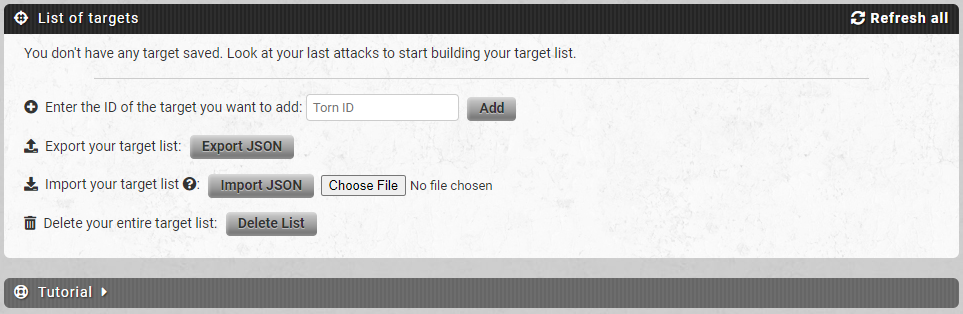
Lets change that. If you don't already have a target, feel free to take this sad sack God of Dongs as your first Target.
(You'll also get the Domino merit for defeating him, if not owned already!)
To add this punching bag to your target list, you want to copy his Torn ID which is outlined in red.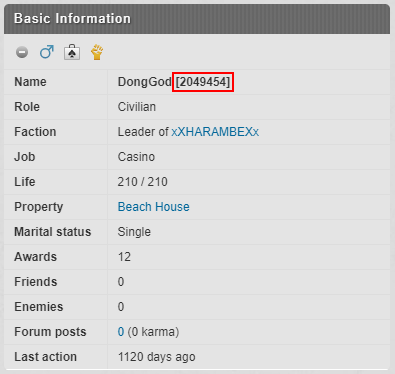
Now go back to your target list in YATA and paste that number in the box shown below then press Add. Repeat this process for any other potential targets you have in mind. Copying the username will result in and error.
When you've added your targets, voila! You have a metaphorical barrel to shoot the metaphorical fish. Otherwise known as a Target List. Now that you have your list, we can explore what all this data means.
-----------------------------------------------
VII. Target List Breakdown
Pro Tip: You can click on the subtitles such as "Level" to sort the table differently.
| Last Attack | Last time you attacked this target. |
| Result | The result of your last attack. |
| Name | Username of the target. Clicking this will open their profile in Torn. CTRL+Click on PC to open tabs. |
| Level | The target's current level as of last update. |
| Active? | Grey = Not Online | Orange = Idle | Green = Online |
| Last Action | The last time this target was active in Torn. |
| Fair Fight | A multiplier value between 1x and 3x. 1x Multiplier is in effect when defeating simple targets. 3x Multiplier is used when the fight is more "fair" relative to total battle stats |
| Flat Respect | Flat Respect = (Ln(x) + 1.0)/4.0 X = Target Level | Source |
| Life | The targets current HP. |
| Status | Targets current activity. Okay, Hospital, Travelling are common in Status. |
| Update | The last time YATA updated this targets information. (Click "Refresh All" on the top-right of the table to refresh all target information. |
| Notes | A spot to input your own notes. Refer to photo for simple examples. |
| Attack | Icon links directly to the targets attack page, rather than profile page. |
| Delete | Deletes target from your list. |
| Faction | [Currently unknown?] |
-----------------------------------------------
VIII. Awards Breakdown
[WIP] To contribute, post below.
-----------------------------------------------
IX. Loot Breakdown
The loot window lets you know what time the Loot Level changes between the NPC's in Torn. With this info, you can attack these NPC's at the right time with a group of other players for your chance at awesome exclusive loot. If you're brave, try and solo one of them. Bet you won't.
The loot window is very basic, so take a look and read on.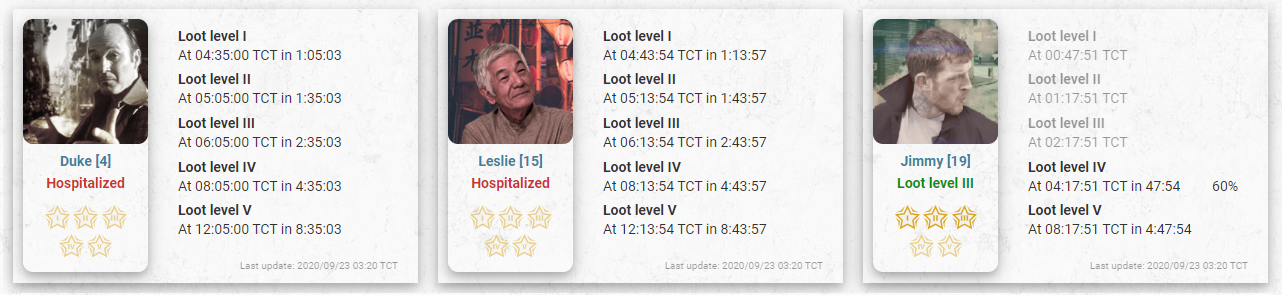
Simple enough, right? Don't be fooled by Duke's pathetic level... He may be a loan shark but he'll change you from a rooster to a hen in one shot.
There's an unspoken rule in Torn...
Attack these chumps at Loot Level IV.
- Aristotle
You'd know this if you paid attention in History 101. Why Level 4? I don't know. Ask Ched to crunch the numbers.
The Torn Wiki does a great job of going into detail that doesn't require YATA, so check it out here for more information.
Selling? Find a trader! || Buying? Find a bazaar!
The Yata link didnt work for me
Fixed - glad this is still helping people 5 years later. <3

Is it possible to fix this?
Thanks
God loves you. Follow him
Like the note says, you will get a better experience with Torn report. Looks like Yata has focused elsewhere. Torn report is also an incredible tool. Check it out :)
![Jsjsosjxdjdj [4044635]](/images/honors/254/h.png)