GRAVED
-
Thread created on 09:51:28 - 14/01/20 (6 years ago)|Last replied 06:37:50 - 22/03/25 (1 year ago)
GRAVED
Last edited by Father on 07:07:52 - 22/03/25 (1 year ago) -
-
Pinned ResponsePosted on 11:44:50 - 14/01/20 (6 years ago)Post link copied to clipboard Copy post linkYes, it can be used in android. I wrote , tested and debugged this fully on my android. No use of PC was involved. For it you will need Google Sheets Android App and Yandex/Kiwi/Mobile Firefox to install Tampermonkey on.
1) Open the link to Spreadsheet in Google Chrome on android. Click on Edit Icon in right corner and open the spreadsheet in Google Sheets Android App. After close it and open Google Sheets App again.
Note: If you have more than one Gmail Id signed in on the device then select the one that is on the top, otherwise you will have to sign out from all other accounts to Deploy the Spreadsheet.
2) Select the Spreadsheet and click on Make a Copy.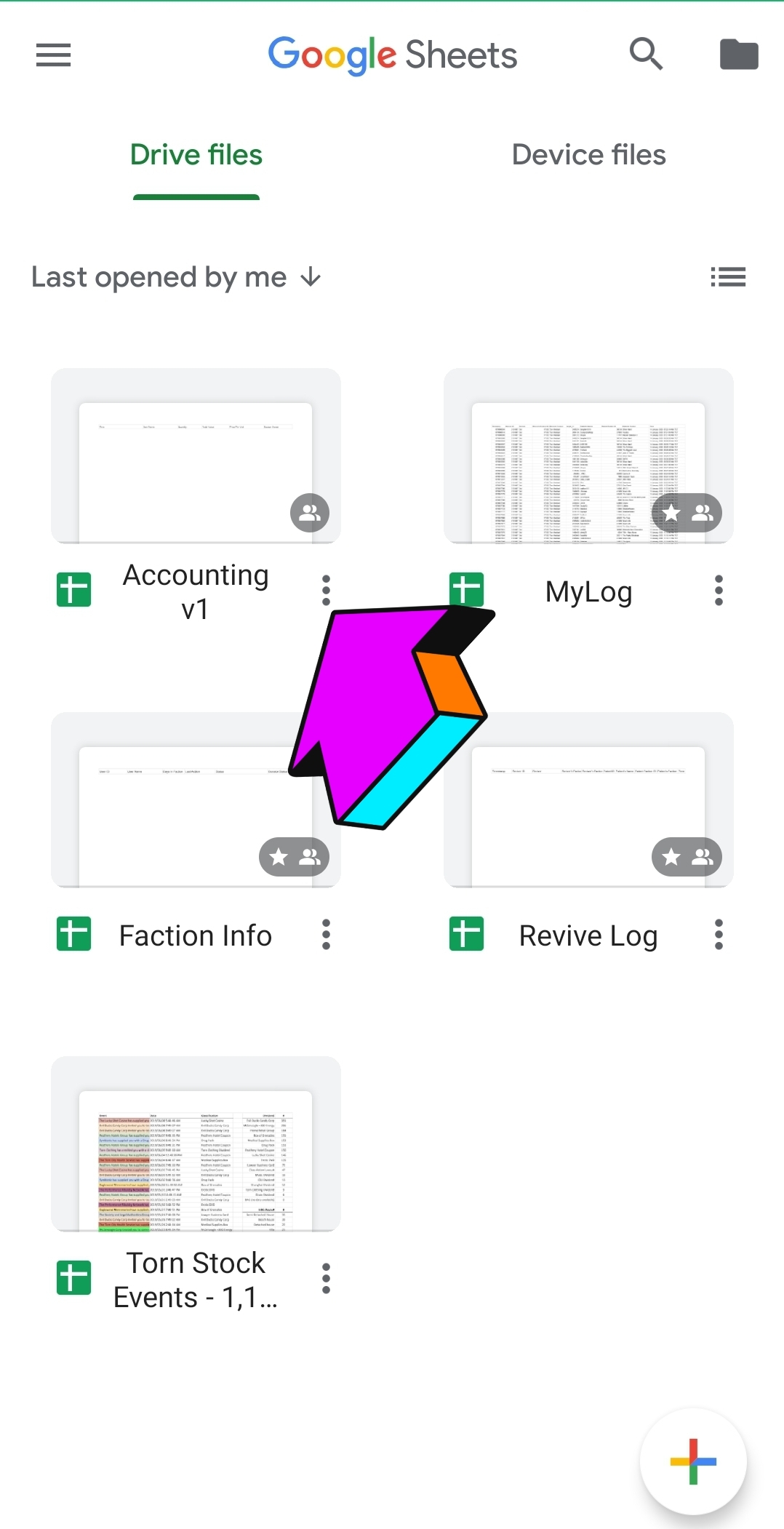
3) You can now remove this spreadsheet. Close Google Sheets App and Open Google Chrome.
4) Go to https://script.google.com/ .
5) Click on the "Accounting Script V1"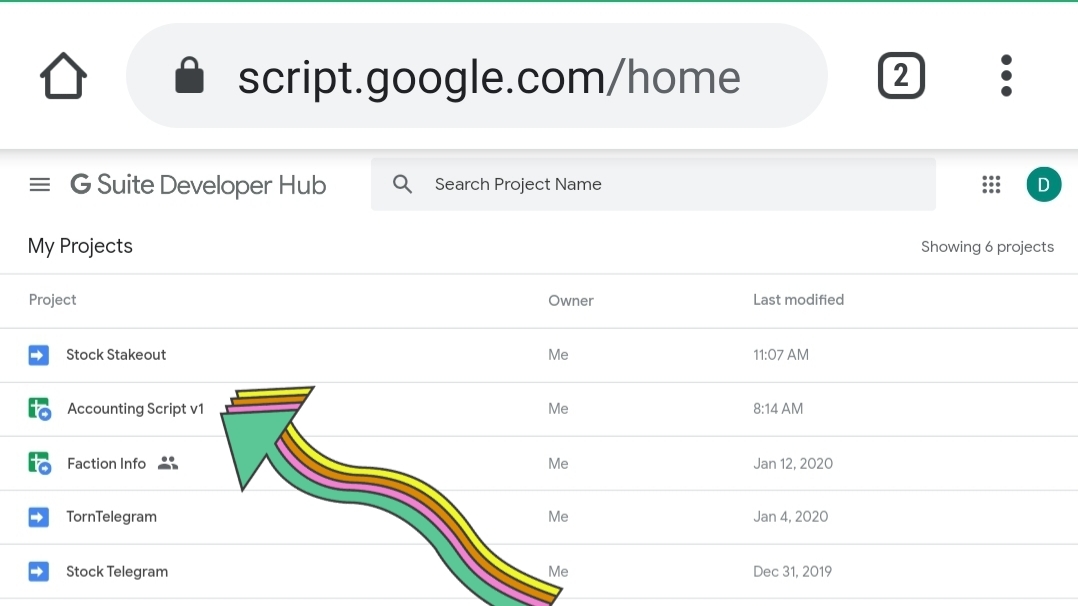
6) Click on "Open Project"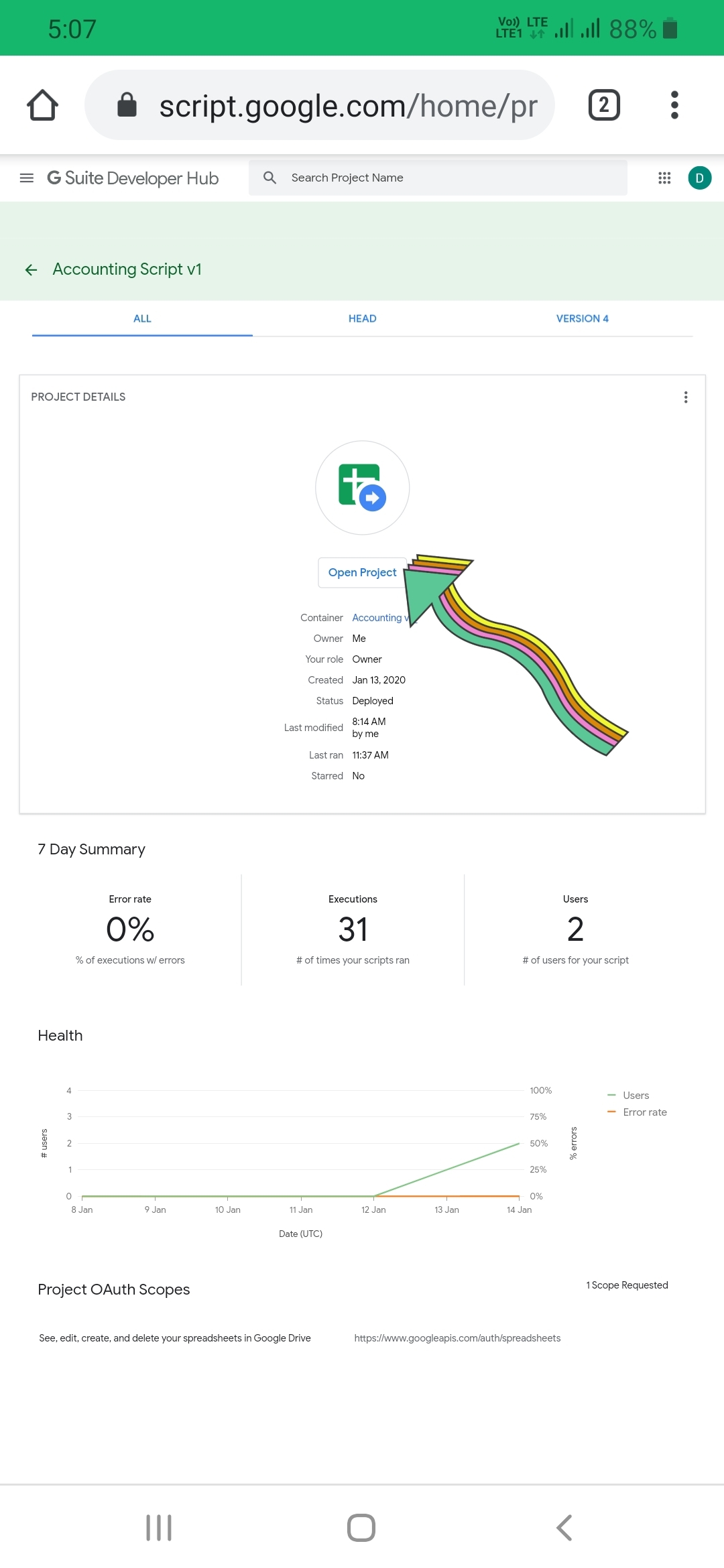
7) Click on Publish > Deploy as Web app.
8) Select the options as:
9) Click on Deploy button. It will give you a link. Copy it.
10) Now get back to Yandex/Kiwi/Firefox whatever browser you are using. Install the Script.
11) Go to Torn Preferences page and put the link that you copied in the box there and select the desired options.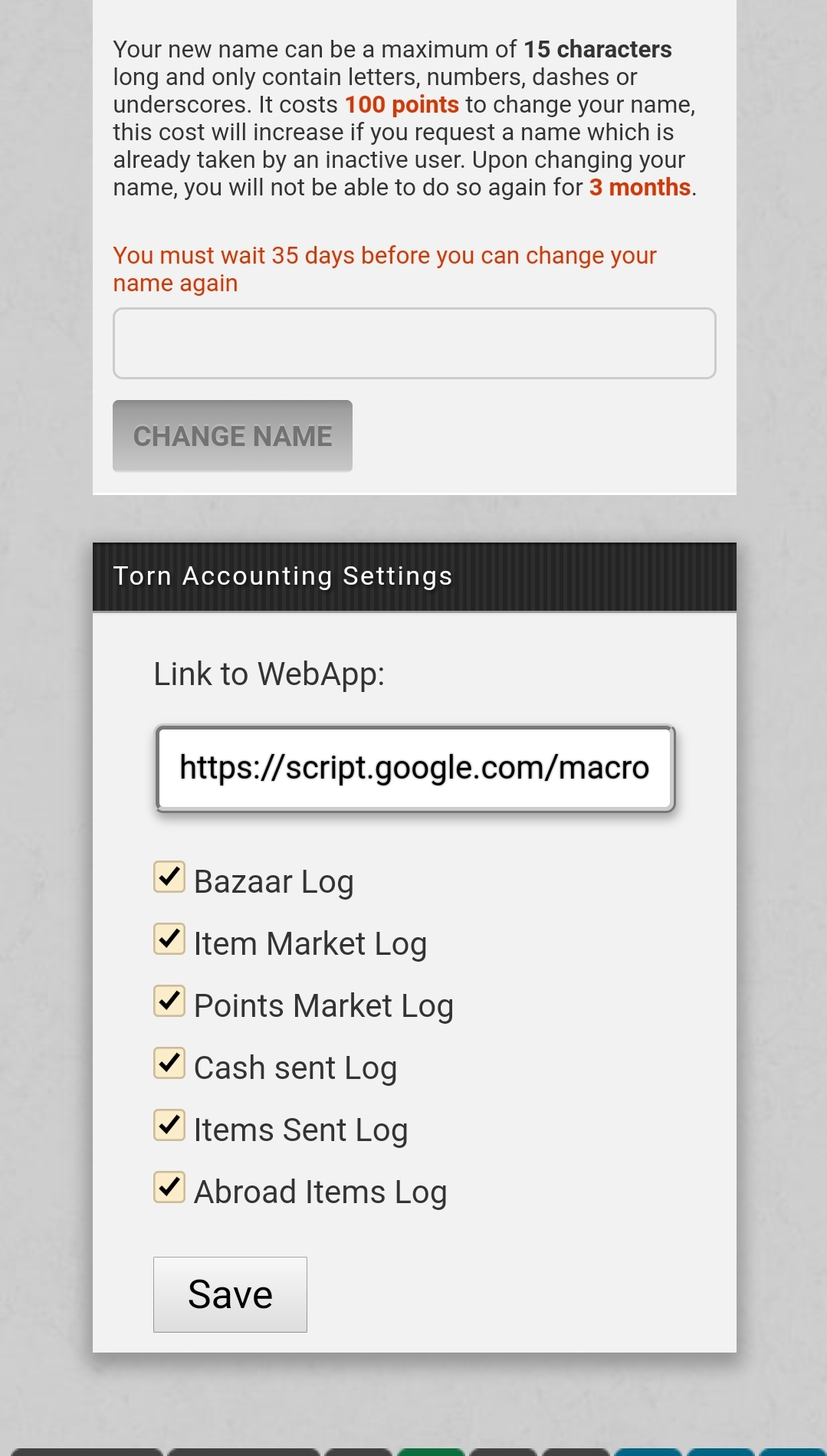
12) Click on Save button.
Edit: Lol, glad that you figured it out. Took me a while to write this post and adding screenshots.
Also what you think about it?Last edited by Father on 11:51:23 - 14/01/20 (6 years ago) -
-
Pinned ResponsePosted on 15:03:49 - 19/05/20 (6 years ago)Post link copied to clipboard Copy post linkSorry for the delay, I have been lazy and demotivated af.
Special Thanks to Helcostr for helping me making this possible.
Updated the script and Spreadsheet code to Version 2.0
Fixed Bazaar Log
Added Cash sent through Mini-profiles
Added User ID for Items and Cash Sent
For the existing users, go to Script Link and update it.
Then go here and copy the code. Go to your Spreadsheet > Tools > Script Editor. Remove the old code and Paste the code there and Click on File > Save. Then Click on Publish > Deploy as Web App.
Select the options as:
Then click on "Update" button and you are all set.
Most of the code is changed from the previous version, so even though I have extensively tested it, if you find any issue please let me know.Last edited by Father on 10:45:49 - 20/05/20 (6 years ago) -
-
Posted on 11:11:12 - 14/01/20 (6 years ago)Post link copied to clipboard Copy post linkAny idea how to do this on mobile using Google sheets?

-
-
Posted on 11:33:49 - 14/01/20 (6 years ago)Post link copied to clipboard Copy post linkI don't think you can set this up while on mobile.
I'm pretty sure that you can't access the scripteditor, which is needed here. -
-
Posted on 11:38:49 - 14/01/20 (6 years ago)Post link copied to clipboard Copy post linkManaged to do a combination lol. Edit it on work pc, mailed the link to my phone and installed on the phoneLast edited by LordofFire on 11:39:49 - 14/01/20 (6 years ago)
-
-
Posted on 11:44:50 - 14/01/20 (6 years ago)Post link copied to clipboard Copy post linkYes, it can be used in android. I wrote , tested and debugged this fully on my android. No use of PC was involved. For it you will need Google Sheets Android App and Yandex/Kiwi/Mobile Firefox to install Tampermonkey on.
1) Open the link to Spreadsheet in Google Chrome on android. Click on Edit Icon in right corner and open the spreadsheet in Google Sheets Android App. After close it and open Google Sheets App again.
Note: If you have more than one Gmail Id signed in on the device then select the one that is on the top, otherwise you will have to sign out from all other accounts to Deploy the Spreadsheet.
2) Select the Spreadsheet and click on Make a Copy.
3) You can now remove this spreadsheet. Close Google Sheets App and Open Google Chrome.
4) Go to https://script.google.com/ .
5) Click on the "Accounting Script V1"
6) Click on "Open Project"
7) Click on Publish > Deploy as Web app.
8) Select the options as:
9) Click on Deploy button. It will give you a link. Copy it.
10) Now get back to Yandex/Kiwi/Firefox whatever browser you are using. Install the Script.
11) Go to Torn Preferences page and put the link that you copied in the box there and select the desired options.
12) Click on Save button.
Edit: Lol, glad that you figured it out. Took me a while to write this post and adding screenshots.
Also what you think about it?Last edited by Father on 11:51:23 - 14/01/20 (6 years ago) -
-
Posted on 12:04:08 - 14/01/20 (6 years ago)Post link copied to clipboard Copy post linkEasy to set up and easy to use. I like having the information stored someplace I can come back and check later. Very nice script. R+ :D
-
-
Posted on 12:45:03 - 14/01/20 (6 years ago)Post link copied to clipboard Copy post linkR+ Indeed. Will give it a go when I get a free moment. I'm glad there is finally a tool to do this which is publicly available.

Buying EOD Armor - (Click Here) -
-
Posted on 16:46:29 - 14/01/20 (6 years ago)Post link copied to clipboard Copy post linkAwesome! I've been waiting for something like this for a long time.
Can't wait to set it up and try it out :)

-
-
Posted on 00:17:21 - 15/01/20 (6 years ago)Post link copied to clipboard Copy post linkThis is an awesome tool. Thank you!

-
-
Posted on 01:05:06 - 15/01/20 (6 years ago)Post link copied to clipboard Copy post linkIt's awesome,thx thx thx, wanted this for so long, makes buying and selling sooooooooo much easier, you are my hero.....Last edited by GrimReaper619 on 01:09:04 - 15/01/20 (6 years ago)
-
-
Posted on 05:15:15 - 16/01/20 (6 years ago)Post link copied to clipboard Copy post linkAny thoughts on upgrading this? Possibly adding recent trades?
-
-
Posted on 05:34:03 - 16/01/20 (6 years ago)Post link copied to clipboard Copy post linkRecent trades? Hmm, you can see your last 10 trades here: https://www.torn.com/trade.php
And if you need more maybe Arson Warehouse has something like that, but not sure as I never used it. But from what I have heard it is a useful utility for traders. You should check it out.
But currently I am busy in some rl stuff and working on 2 other spreadsheets. I may look into it later, but I make no promises.
Edit: Link to Arson WarehouseLast edited by Father on 05:41:26 - 16/01/20 (6 years ago) -
-
Posted on 12:56:33 - 16/01/20 (6 years ago)Post link copied to clipboard Copy post linkGreat work Sid! I’m going to give it a shot to see it in action. Very generous of you to use your spare time on this, I don’t imagine it was an easy task!
Edit: Yes, ArsonWarehouse shows buyers their trades from the last 3 months. I’ll add filters and search options soon as was requested in the awh thread by LordofFire.Last edited by Sulsay on 14:10:37 - 16/01/20 (6 years ago)Arson Warehouse - Foreign stock table and trading software
-
-
Posted on 10:56:45 - 18/01/20 (6 years ago)Post link copied to clipboard Copy post linkAs explained by sid, you can actually access it by going to scripts.google.com
You can even enter the script editor, but it hasn't been optimized for mobile so it's not very nice to use (you can't select a snippet of code for example, it's either backspace or select the entire script..)
It can be useful if you need to do a quick fix while you don't have access to a PC, remove or add triggers, that sort of stuff. -
-
Posted on 11:58:01 - 18/01/20 (6 years ago)Post link copied to clipboard Copy post linkI found a conflict with the noconfirmbuy script from DKK.
It doesn't update the spreadsheet if you have that enabled.
Looks like the accounting script triggers on the confirm, so it doesn't register purchases that don't have the confirm prompt? -
-
Posted on 13:54:19 - 18/01/20 (6 years ago)Post link copied to clipboard Copy post linkTbh, I doubt the conflict is because of lack of confirm prompt. As all DKK's script does is change the HTML and doesn't affect the server-side responses. While my script doesn't depend on HTML and read the server responses. So the conflict is not due to the lack of 'confirm prompt'. Besides one of the alpha testers reported that a script named 'Lowest Bazaar Price' also sometimes has the conflict with it.Last edited by Father on 13:55:03 - 18/01/20 (6 years ago)
-
-
Posted on 14:33:34 - 18/01/20 (6 years ago)Post link copied to clipboard Copy post linkCurrently the only other scripts I have enabled are bazaar scam warning (from sulsay I think), and doctorn.
Edit: it does work if I don't have noconfirmbuy enabled
Edit edit: I just noticed you can change the load order in the tampermonkey dashboard. Setting this script at #1 fixed the issue.Last edited by SVD_NL on 14:41:57 - 18/01/20 (6 years ago) -
-
Posted on 14:39:22 - 18/01/20 (6 years ago)Post link copied to clipboard Copy post linkI didn't say that there was no conflict with DKK's script. I said that the conflict with DKK's script is not caused because of lack of 'Confirm Prompt'.
-
-
Posted on 14:43:05 - 18/01/20 (6 years ago)Post link copied to clipboard Copy post linkI was just giving some extra info.
I edited that post with some more testing (I didn't see you had responded yet).
Changing the load order fixed the issue. -

![Father [2131687]](/images/honors/50/h.png)
![LordofFire [2411517]](/images/honors/834/h.png)

![DeKleineKobini [2114440]](/images/honors/700/h.png)
![CainToad [2104152]](/images/honors/522/h.png)

![Hornz [2220919]](/images/honors/498/h.png)
![SVD_NL [2363978]](/images/honors/534/h.png)
![ZackMorris [1578811]](/images/honors/158/h.png)
![GrimReaper619 [2409630]](/images/honors/608/h.png)
![drk0 [2433907]](/images/honors/611/h.png)


![Sulsay [2173590]](/images/honors/1271/h.png)