Using DoctorN on android (Now on Yandex too)
-
Thread created on 08:55:01 - 06/04/19 (7 years ago)|Last replied 11:39:39 - 30/11/20 (5 years ago)Note: After the version 7.7.0 of DoctorN, it now again works on Yandex.
Hello everyone. With the release of Android app there has been a significant increase in the playerbase. And now a lot of players primarily use Mobile to play Torn. Most of them don't know how to use extensions on mobile, so they assume that can't enjoy the perks just because they don't play on PC. Today I am trying to help you guys know how to use Extensions and Userscripts on Android devices.
On Android, there are mainly 3 browsers that can be used to install extensions and Userscripts.
1)Yandex Browser : This browser supports most of the Chrome extensions and let you run them on mobile. I prefer it more because it's way faster than Firefox.
After 7.7.0 Update of DoctorN, it now works on Yandex too.
Installing DoctorN: Open this link in your Yandex browser. Click on add to Chrome and Voila.
How to install extensions on Yandex: The process of installing extensions on Yandex is almost similar as of Chrome on PC. You just have to open the extension in Chrome Web Store and click on "Add to Chrome" option
.
It will open a dialog box, listing all the permissions the extensions require to work and will ask you whether you want to continue or not. Click on "Add Extension".
After the extension in question is installed you can open it's settings by following the steps as shown:
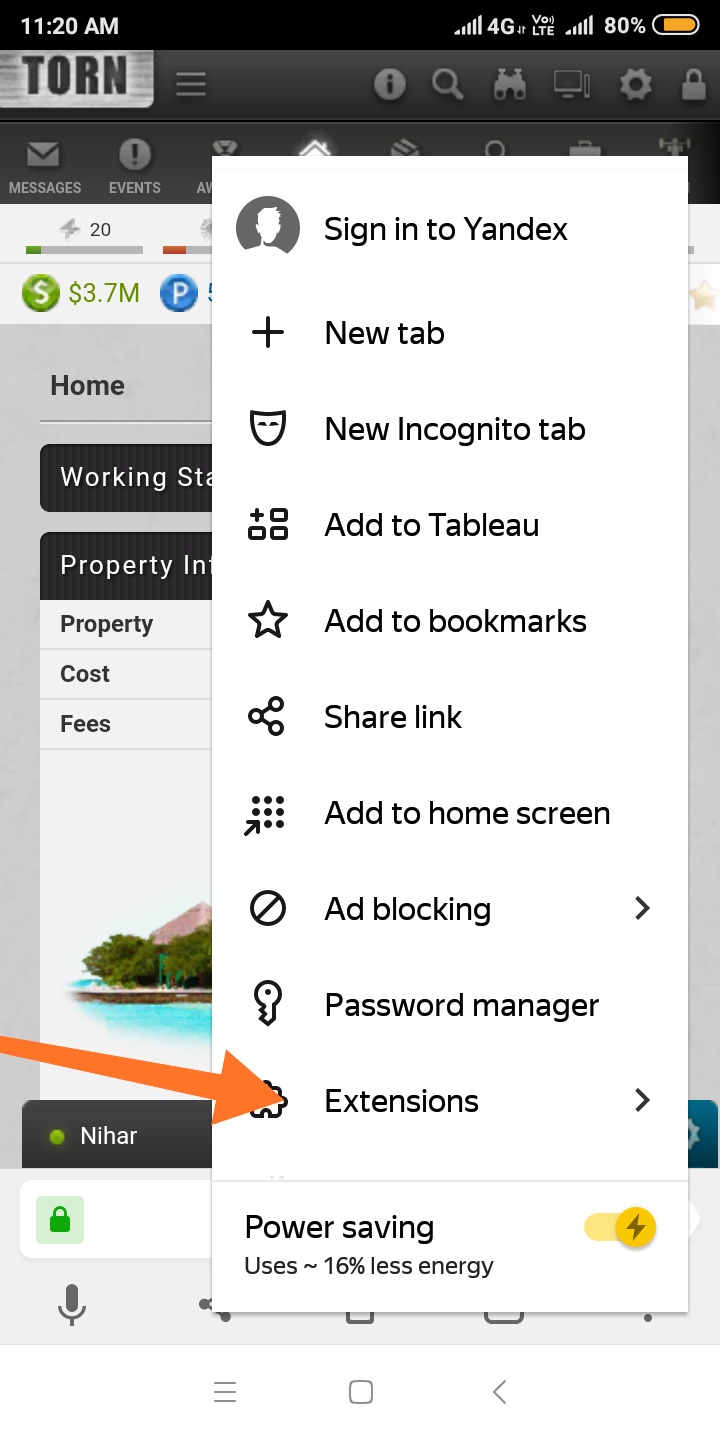
It will show the list of the installed extensions. Something like this:
In this way you can install chrome extentions on mobile. Yandex Browser supports most of the extensions that I have tried.
How to use Userscripts ?
For using Userscripts you are going to have to install Tampermonkey on the Yandex Browser
Download link : Tampermonkey
Most of the Userscripts these days are written to work with Tampermonkey. So it's the best tool for running Userscripts.
Most of publically available Torn City Userscripts are hosted on Greasyfork.
In websites like Greasyfork, you simply have to click on Install button and it will open a Tampermonkey dialog Box asking you for confirmation. Like this: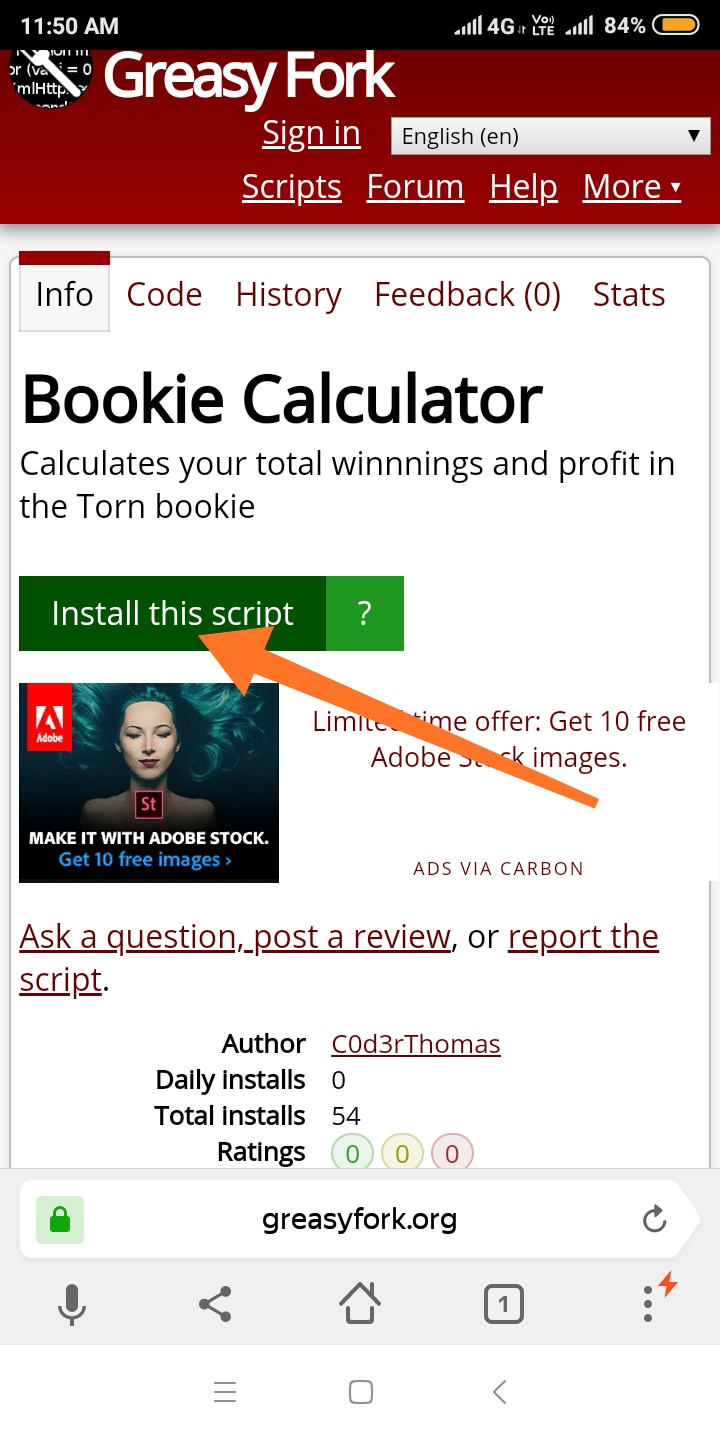
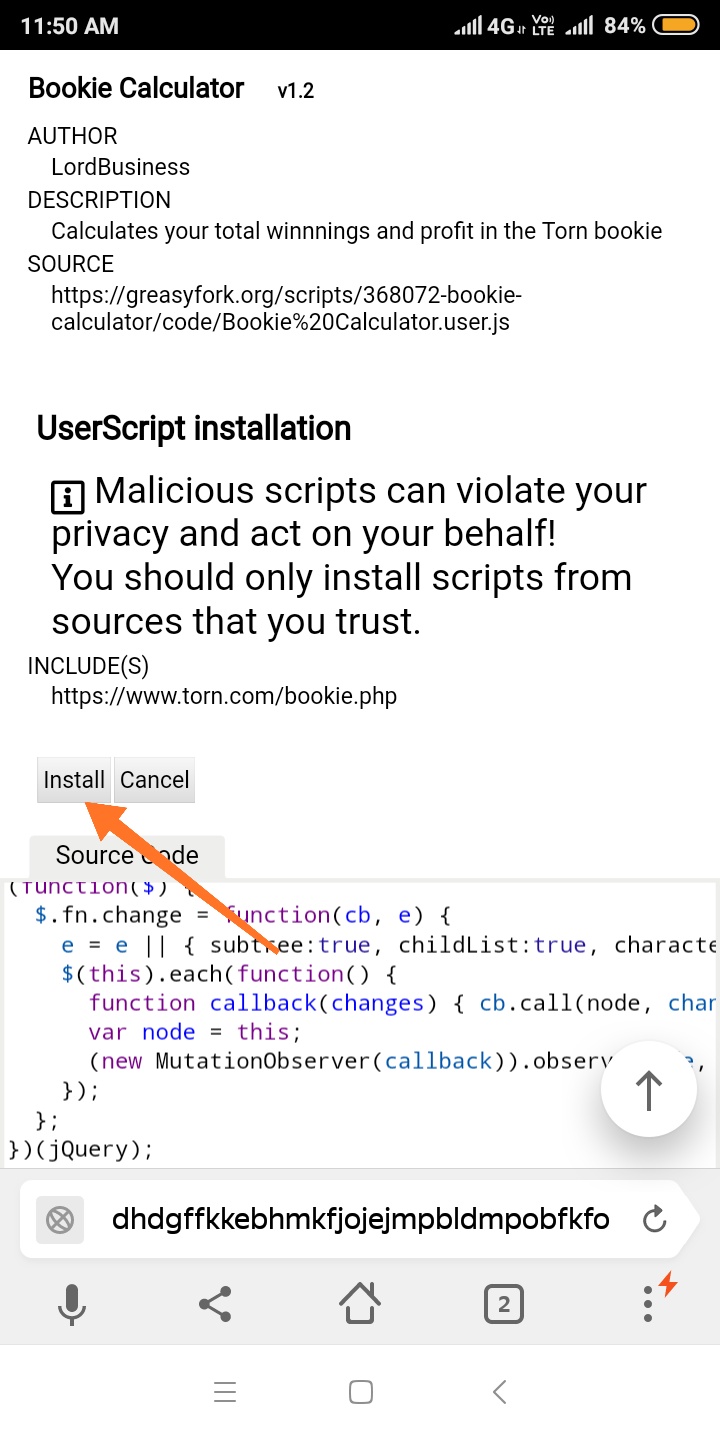
And Bingo. You can now use the Userscript.
If the Userscript you are trying to install is not hosted on Greasyfork or you are unable to install it directly, then you will have to manually install them.
1) Select and copy the Source Code of script.
2) Open the Tampermonkey settings. Click on " Create a new Script".
3) Delete all the data on screen and paste the source code.
4) Click on File< Save
You can also turn on/ off an installed script.
Debugging/ Editing a Userscript
We all are humans and we all make mistakes. Sometimes you find a bug in the Userscript you are using and want to correct it. Or you want to modify a script you are using to add some new feature to it. So I am gonna tell you how you can edit it.
Torn's url for mobile version and desktop version are same. So scripts made for desktop will most likely also work on mobile.
Many websites use different urls for desktop and mobile.
Eg: https://m.youtube.com/
This is the url of YouTube if you open it on mobile, while on Desktop it starts with www.
In case of these websites you will have to Edit the Userscript to make it run on mobile.
To edit a Userscript, you will have to open Tampermonkey settings.
1) Click on Dashboard. Click on the edit icon corresponding to the script you want to debug.
If you are facing the problems because of difference between mobile and Desktop url then you will have to edit the text corresponding to @match.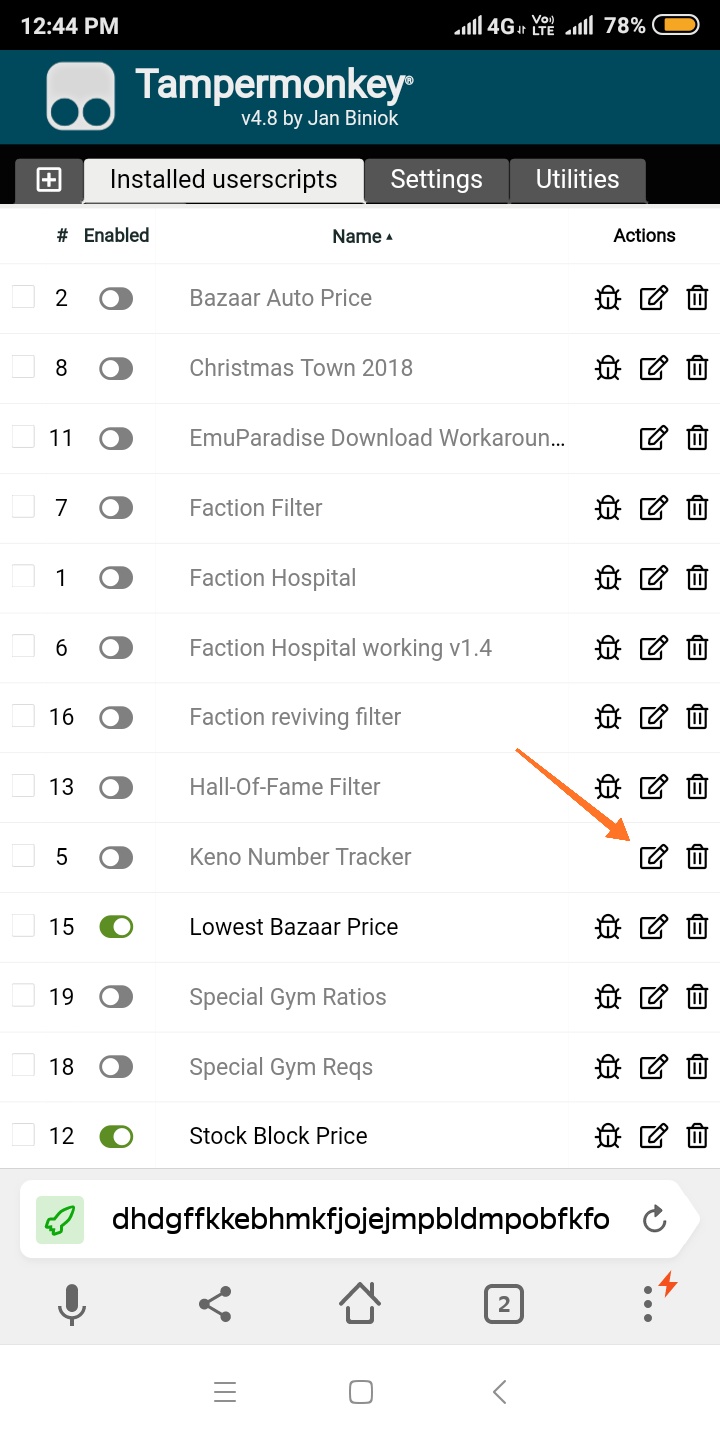
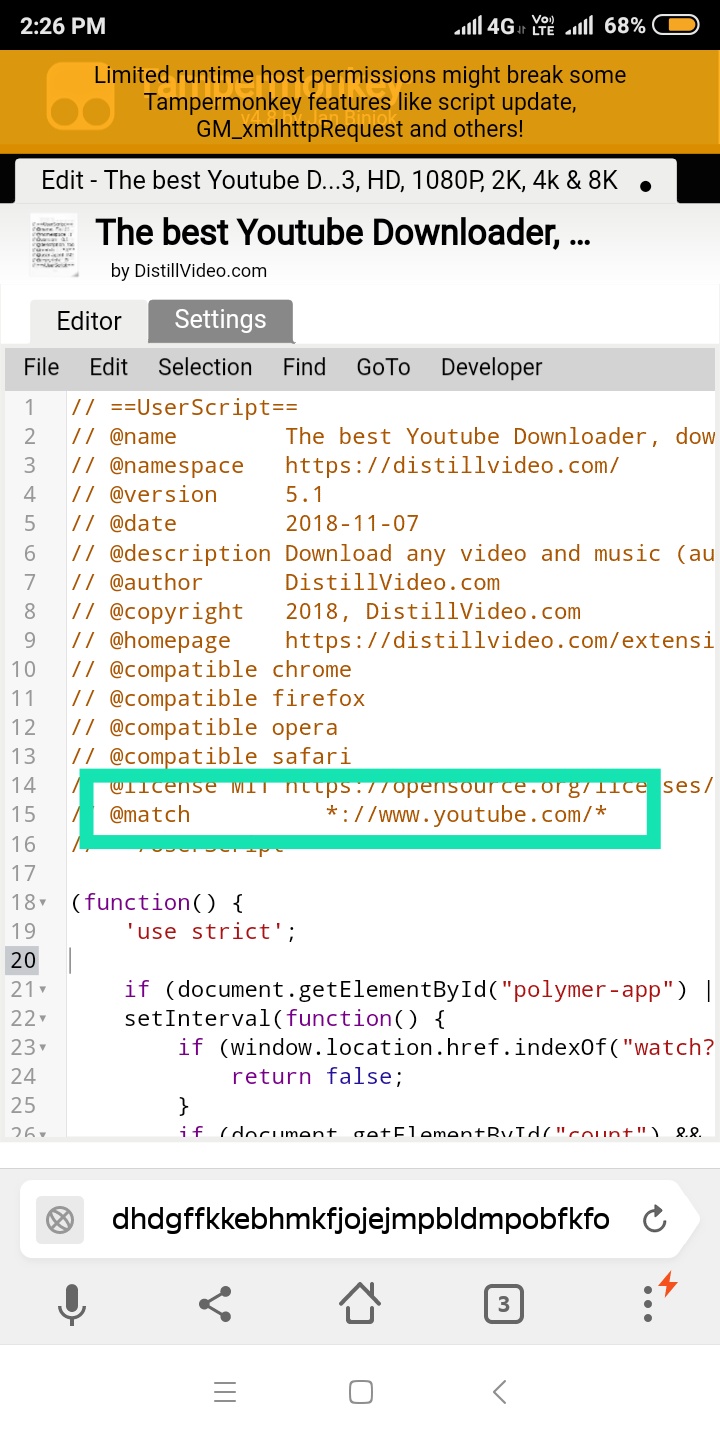
For example in that ^ script, you will have to replace "www" with "m" or "*".
So this way you can debug the scripts you are using.
Personal Statistics Comparison : DoctorN provides stat comparison feature, that is not available in TornPlus. As an alternative you can use TornStats script. It's nowhere as pretty, but it gets the job done.
This Browser let's you use most of Chrome extensions but some are not supported eg. DoctorN. Scroll down to see how to use DoctorN on mobile.Last edited by Father on 14:09:35 - 14/11/19 (6 years ago) -
-
Pinned ResponsePosted on 00:04:57 - 05/05/19 (7 years ago)Post link copied to clipboard Copy post linkHello everyone. With the recent Add-on certificate expiry issue all Firefox extensions suddenly stopped working. They said it is fixed for PC, but last time I checked Mobile users were still having this problem. So now I am going to tell you another way of using Chrome extensions on mobile. This method even supports DoctorN.
Download Kiwi Browser on your device.
This Browser is basically android Chrome on steroids.
After installing it type chrome://extensions in the address bar. Toggle Developer mode and Click on Kiwi web Store. It will open the Chrome Web Store. Due to some reasons it will be in some foreign language but it won't be a problem. In the search bar on right search the name of extension.
And then click on the blue button corresponding to the desired extension, as shown.
You can access the extension settings by clicking on the drop-down menu on right side and scrolling down.
And Bingo. You are good to go. I tried quick crimes and it is working for me. I found this one way smoother than Yandex or Firefox so I am switching to this Browser. If you have any questions let me know.Last edited by Father on 01:00:25 - 02/06/19 (7 years ago) -
-
Posted on 08:56:12 - 06/04/19 (7 years ago)Post link copied to clipboard Copy post linkHow to use DoctorN on mobile/ How to install extensions using Firefox
Firefox on mobile is never going to be my first choice for a browser. But since you can't use DoctorN on mobile without it, it becomes a necessity. You can download extensions from Firefox Store or install them manually if you have the .xpi file. Since DoctorN is not available in Firefox store due to some reasons, we will have to manually download it from DoctorN Website . Go the website, scroll down and click on Firefox icon. Install the extension and viola.
You can sign in by going to Preferences . DoctorN will show a dialog box when you go there. Click on sign in.
A lot of users had a problem in adding Quick items and crimes to DoctorN. I am gonna show you how to add them in mobile.
Credit for this goes to Pi77bull [2082618] . He posted this method Here .
Initial part of this will have to be done by you guys yourself. I am sure you can follow it. But I am think maybe most of you don't know how to create Userscript in Tampermonkey. Below are the instructions.
1) Install Tampermonkey for Firefox
2) Then
Click on Tampermonkey
3) Write the script. Click on File
Below is an example of the script.
// ==UserScript==
// @name DoctorN Quick Shortcut
// @namespace http://tampermonkey.net/
// @version 1.0
// @description Adds quick Crimes and Items in Mobile
// @author Yomama
// @match https://www.torn.com/*
// @grant none
// ==/UserScript==
(function() {
'use strict';
let quickcrimes = '[{"id":"warehouse"}]'; // this is one of the strings you saved in your notepad ealier
let quickitems = '[{"id":180,"name":"Bottle of Beer"},{"id":206,"name":"Xanax"},{"id":731,"name":"Empty Blood Bag"},{"id":732,"name":"Blood Bag : A+"}]'; // this is the other string in your notepad
localStorage.setItem("doctorn-widget--quick-crimes__crimes", quickcrimes);
localStorage.setItem("doctorn-widget--quick-items__items", quickitems);
})();
. Result

Disable or delete the script once it is done. Thanks to Pi77bull for letting me use it in my guide.
The method of installing scripts to Tampermonkey in Firefox from Greasyfork is same as in Yandex.
Due to some reasons I can't access Tampermonkey options the way I can access on Yandex. I am not sure if it's just me or the extension is a bit broken. So you will have to access the options like I showed above.
I don't recommend using Firefox due to it's slowness, but you will have to endure it if you want to enjoy the perks of DoctorN. I hope it helps you guys.
Feel free to contact me, if anyone of you encounters a problem, I will try to help as much as I can.
Edit: With the recent certificate issue all add-ons stopped working on Firefox. I am giving a workaround. Here is the source.
Type about:config in the address bar and press enter.
Toggle xpinstall.signatures.required as false.
Toggle extensions.langpacks.signatures.required as false.
And you are good to go.Last edited by Father on 03:14:39 - 05/05/19 (7 years ago) -
-
Posted on 09:53:46 - 06/04/19 (7 years ago)Post link copied to clipboard Copy post linkR+
-
-
Posted on 10:58:36 - 06/04/19 (7 years ago)Post link copied to clipboard Copy post linkYou are a good person. Great write-up. R+
-
-
Posted on 13:26:34 - 06/04/19 (7 years ago)Post link copied to clipboard Copy post linkWow, this is super detailed and helpful! Going to get this all set up on my tablet now :D Thank you!

-
-
Posted on 03:23:35 - 07/04/19 (7 years ago)Post link copied to clipboard Copy post linkDoctorn is now broken on mobile. Both yandex and firefox.Last edited by Zasty on 03:23:50 - 07/04/19 (7 years ago)
-
-
Posted on 03:24:43 - 07/04/19 (7 years ago)Post link copied to clipboard Copy post linkI can say for sure it is broken on Yandex but it is working on Firefox, atleast for me.
-
-
Posted on 03:41:45 - 07/04/19 (7 years ago)Post link copied to clipboard Copy post linkDoctorn works with firefox, but you cant acess the setting pages.
-
-
Posted on 03:45:51 - 07/04/19 (7 years ago)Post link copied to clipboard Copy post linkOn mobile? It's working fine for me.

Although I remember it wasn't working on PC about 2 days ago. -
-
Posted on 11:03:59 - 13/04/19 (7 years ago)Post link copied to clipboard Copy post linkbump

-
-
Posted on 00:04:57 - 05/05/19 (7 years ago)Post link copied to clipboard Copy post linkHello everyone. With the recent Add-on certificate expiry issue all Firefox extensions suddenly stopped working. They said it is fixed for PC, but last time I checked Mobile users were still having this problem. So now I am going to tell you another way of using Chrome extensions on mobile. This method even supports DoctorN.
Download Kiwi Browser on your device.
This Browser is basically android Chrome on steroids.
After installing it type chrome://extensions in the address bar. Toggle Developer mode and Click on Kiwi web Store. It will open the Chrome Web Store. Due to some reasons it will be in some foreign language but it won't be a problem. In the search bar on right search the name of extension.
And then click on the blue button corresponding to the desired extension, as shown.
You can access the extension settings by clicking on the drop-down menu on right side and scrolling down.
And Bingo. You are good to go. I tried quick crimes and it is working for me. I found this one way smoother than Yandex or Firefox so I am switching to this Browser. If you have any questions let me know.Last edited by Father on 01:00:25 - 02/06/19 (7 years ago) -
-
Posted on 17:23:48 - 05/05/19 (7 years ago)Post link copied to clipboard Copy post linkThis is such an immense help, I can't thank you enough. I'd R+ 50 more times if I could! Kiwi is a gem and I'm so glad to be quit of laggy, buggy firefox.Last edited by Lalop on 17:25:14 - 05/05/19 (7 years ago)
I was gonna go to bed but gdi now i'm all hyped up about orcas
-
-
Posted on 23:59:56 - 05/05/19 (7 years ago)Post link copied to clipboard Copy post linkIf I get doctorn on my android will i be able to use it through the app or will I have to use the browser? Seems like more work if I have to use the browser.
-
-
Posted on 00:20:53 - 06/05/19 (7 years ago)Post link copied to clipboard Copy post linkYou will have to use the Browser.
-
-
Posted on 00:24:18 - 06/05/19 (7 years ago)Post link copied to clipboard Copy post linkBut it will send notifications to my phone if I'm staking someone out?
-
-
Posted on 00:49:12 - 06/05/19 (7 years ago)Post link copied to clipboard Copy post linkIt will as long as the browser is open.
-
-
Posted on 01:44:17 - 06/05/19 (7 years ago)Post link copied to clipboard Copy post linkIn my experience it's very good (sometimes terribly startling lol) at sending notifications even if the phone is "sleeping"-- it does stop after you end the browser process through/swipe out.Last edited by Lalop on 01:44:52 - 06/05/19 (7 years ago)
I was gonna go to bed but gdi now i'm all hyped up about orcas
-
-
Posted on 09:03:01 - 06/05/19 (7 years ago)Post link copied to clipboard Copy post linkWell, you forgot that this is not available in some country so you need vpn to download that.
-
-
Posted on 09:11:23 - 06/05/19 (7 years ago)Post link copied to clipboard Copy post linkI wasn't aware of it until now. So you have to use VPN to surf using this Browser in your country? Or to download it from Google Play?
-
-
Posted on 12:11:14 - 06/05/19 (7 years ago)Post link copied to clipboard Copy post linkUsing vpn to download it then use it as nornal.
-


