[Script] Rem4rk's Locked Items Manager - v3.5.4 | Tools &…

[Script] Rem4rk's Locked Items Manager - v3.5.4

​

    • rem4rk [2375926]
    • Role: Civilian
    • Level: 62
    • Posts: 110
    • Karma: 58
    • Last Action: 9 minutes
      • 0
    • Reason:
      Are you sure you want to report this post to staff?
      Cancel
    Thread created on 00:59:23 - 18/01/26 (9 months ago)
    |
    Last replied 04:41:34 - 23/03/26 (7 months ago)

    [Script] Rem4rk's Locked Items Manager v3.5.4


    Hi everyone,

    I wanted to share a Locked Items Manager userscript I’ve created. I haven't seen anyone make one of these that allows you to fully lock down an item so it cannot be removed from the inventory, or with other quality of life features like reminding the user that items are locked, a locked items counter, or an unlock all items button. It’s designed to make it so you will never accidentally sell or trash an item accidentally ever again! This script does not break Torn rules or automation policies.


    You can download the script here or you can find the link to it on my profile signature!


    Features

    • Lock/Unlock Buttons: Clicking on the padlock buttons from your inventory will allow you to lock/unlock any item. This stops you from being able to send, donate, trash, or sell the item, but it will not prevent you from using it.
    • RW Support: The script correctly stores the unique ID of ranked weapons when locking them, so you can sell off the RW you dont want, while keeping the one's you prefer!
    • Transparent locks: An unlocked item will have an unlocked padlock pre-pended to its name, and locking the item will make the symbol opaque, allowing the user to easily identify which items are locked/unlocked at a glance!

    5jmd6Cz.png


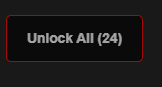
    • Unlock All Button/Lock Counter/Confirmation: In the inventory there is a button to the left that when clicked will unlock ALL locked items at once, and in the brackets is a counter showing off how many items you have currently locked. When you click the unlock all button, a small confirmation popup will appear asking you if you wish to proceed.

    CxCFn5v.png9a753b40-2811-4e8b-8d5a-c7e15133ee40-2375926.png


    • Lock/Unlock Toasts: When locking/unlocking an item, a small toast will appear in the top right of the screen telling you whether or not you locked the item. 
    • Info Toasts: If you are on a page that allows you to add to Bazaar, Item Market, Trades, Faction Donations, or sell to NPCs, you will see a Toast fly into the page reminding you that some items have been locked.

    l3F4xkS.pngvTHAH16.png


    • Locked Items are Excluded from Listings: If an item is locked, it will NOT show up as an item to add to Bazaar, Item Market, Trades, Faction Donations, or selling to NPCs. In the below example, I have locked my Small First Aid Kits, and they now do not show up as an option on these pages.

    3tA4Fn7.png


    • Settings Panel: You can now toggle on and off almost every visual feature of the script! Just click the gear icon on the top left to open the pop-up window! A popup panel will appear, offering customization options to users such as disabling transparent locks, toasts, and the unlock all button.

    y9aCwEQ.png

    • Non-intrusive/Rule Compliant: Only affects the Inventory, Bazaar, Trade, Item Market, City Shops, Faction Armory pages and how they are displayed and does not interact with Torn gameplay or automate any actions. The script WILL NOT scrape pages you are not viewing.


    How to Use

    1. Install a userscript manager like Tampermonkey.
    2. Download it here or from the link in my profile signature.
    3. Lock an item from inventory.
    4. You will never accidentally list an item again!

    Safe and Torn-Rule Compliant

    • This script only allows you to lock actions on an item to help you protect it from accidental trades.
    • It does not automate any item actions, page refreshes, or send any actions to Torn’s servers.
    • It’s purely for personal convenience.


    Tips

    • This script is perfect for keeping valuable/rare items safe!
    • Locked items are saved to browser storage, and the script should remember what items are locked.
    • If you would like to download an older version the link is here.


    Hope this helps fellow Torn players make avoid any accidental item trades/trashes!

    — rem4rk [2375926]

    Last edited by rem4rk on 09:12:44 - 06/02/26 (8 months ago)
    • Iceknave [2786085]
    • Role: Civilian
    • Level: 100
    • Posts: 105
    • Karma: 61
    • Last Action: 2 hours
      • 0
    • Reason:
      Are you sure you want to report this post to staff?
      Cancel
    Posted on 05:52:57 - 18/01/26 (9 months ago)
    Post link copied to clipboard Copy post link

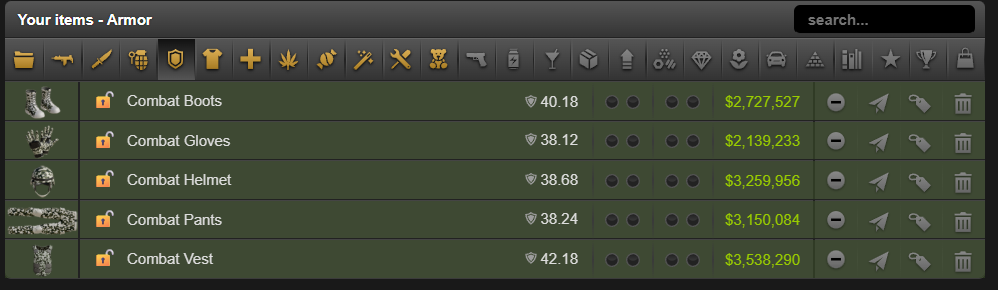
    Interesting idea, but for some reason, any equipped items seemed to show up twice, which is a bit odd.

    • rem4rk [2375926]
    • Role: Civilian
    • Level: 62
    • Posts: 110
    • Karma: 58
    • Last Action: 9 minutes
      • 0
    • Reason:
      Are you sure you want to report this post to staff?
      Cancel
    Posted on 06:56:25 - 18/01/26 (9 months ago)
    Post link copied to clipboard Copy post link

    Iceknave [2786085]

    Interesting idea, but for some reason, any equipped items seemed to show up twice, which is a bit odd.

    Interesting, I haven't been able to replicate that on my side, can you give me more info about the issue? Or a screenshot?


    Closest thing I could find was that if I have grenades equipped, if I try to list them, it shows the equipped item and the unequipped stack. Which is normal behaviour.

    • Damien [3030216]
    • Role: Civilian
    • Level: 100
    • Posts: 242
    • Karma: 550
    • Last Action: 5 hours
      • 0
    • Reason:
      Are you sure you want to report this post to staff?
      Cancel
    Posted on 08:02:12 - 18/01/26 (9 months ago)
    Post link copied to clipboard Copy post link

    The big red banner on the faction page is annoying, cant even see the links at the top. but great script.


    Forum-sig.gif

    • rem4rk [2375926]
    • Role: Civilian
    • Level: 62
    • Posts: 110
    • Karma: 58
    • Last Action: 9 minutes
      • 0
    • Reason:
      Are you sure you want to report this post to staff?
      Cancel
    Posted on 08:07:42 - 18/01/26 (9 months ago)
    Post link copied to clipboard Copy post link

    Damien [3030216]

    The big red banner on the faction page is annoying, cant even see the links at the top. but great script.


    I'll look into another option, I'm considering making it only show up for a few seconds, then fade away. 


    If you have another solution you think would work better, I am open to any ideas.

    • Damien [3030216]
    • Role: Civilian
    • Level: 100
    • Posts: 242
    • Karma: 550
    • Last Action: 5 hours
      • 0
    • Reason:
      Are you sure you want to report this post to staff?
      Cancel
    Posted on 08:11:21 - 18/01/26 (9 months ago)
    Post link copied to clipboard Copy post link

    Damien [3030216]

    The big red banner on the faction page is annoying, cant even see the links at the top. but great script.


    rem4rk [2375926]

    I'll look into another option, I'm considering making it only show up for a few seconds, then fade away. 


    If you have another solution you think would work better, I am open to any ideas.

    Maybe on the side of the screen like under where it flashes that you locked an item

    Forum-sig.gif

    • rem4rk [2375926]
    • Role: Civilian
    • Level: 62
    • Posts: 110
    • Karma: 58
    • Last Action: 9 minutes
      • 0
    • Reason:
      Are you sure you want to report this post to staff?
      Cancel
    Posted on 08:28:55 - 18/01/26 (9 months ago)
    Post link copied to clipboard Copy post link

    Damien [3030216]

    The big red banner on the faction page is annoying, cant even see the links at the top. but great script.


    rem4rk [2375926]

    I'll look into another option, I'm considering making it only show up for a few seconds, then fade away. 


    If you have another solution you think would work better, I am open to any ideas.

    Damien [3030216]

    Maybe on the side of the screen like under where it flashes that you locked an item

    I've updated the script.


    I've replaced the big red banner with a blue toast that flies in and then goes away after a few seconds (similar style to the other toasts).
    Should hopefully fix the issue of links at the top being hidden, and it shouldn't reset any of your locked items when you update either.


    Let me know how this goes.

    Last edited by rem4rk on 08:30:25 - 18/01/26 (9 months ago)
    • Damien [3030216]
    • Role: Civilian
    • Level: 100
    • Posts: 242
    • Karma: 550
    • Last Action: 5 hours
      • 0
    • Reason:
      Are you sure you want to report this post to staff?
      Cancel
    Posted on 09:14:42 - 18/01/26 (9 months ago)
    Post link copied to clipboard Copy post link
    Damien [3030216]

    The big red banner on the faction page is annoying, cant even see the links at the top. but great script.


    rem4rk [2375926]

    I'll look into another option, I'm considering making it only show up for a few seconds, then fade away. 


    If you have another solution you think would work better, I am open to any ideas.

    Damien [3030216]

    Maybe on the side of the screen like under where it flashes that you locked an item

    rem4rk [2375926]

    I've updated the script.


    I've replaced the big red banner with a blue toast that flies in and then goes away after a few seconds (similar style to the other toasts).
    Should hopefully fix the issue of links at the top being hidden, and it shouldn't reset any of your locked items when you update either.


    Let me know how this goes.

    So much better, I can handle that. Thanks dude. no more losing my high quality base items.

    Forum-sig.gif

    • Damien [3030216]
    • Role: Civilian
    • Level: 100
    • Posts: 242
    • Karma: 550
    • Last Action: 5 hours
      • 0
    • Reason:
      Are you sure you want to report this post to staff?
      Cancel
    Posted on 09:15:13 - 18/01/26 (9 months ago)
    Post link copied to clipboard Copy post link
    Love that is goes away.

    Forum-sig.gif

    • Iceknave [2786085]
    • Role: Civilian
    • Level: 100
    • Posts: 105
    • Karma: 61
    • Last Action: 2 hours
      • 0
    • Reason:
      Are you sure you want to report this post to staff?
      Cancel
    Posted on 17:58:34 - 18/01/26 (9 months ago)
    Post link copied to clipboard Copy post link

    Iceknave [2786085]

    Interesting idea, but for some reason, any equipped items seemed to show up twice, which is a bit odd.

    rem4rk [2375926]

    Interesting, I haven't been able to replicate that on my side, can you give me more info about the issue? Or a screenshot?


    Closest thing I could find was that if I have grenades equipped, if I try to list them, it shows the equipped item and the unequipped stack. Which is normal behaviour.

    22e4e841-a994-4abf-a596-937c186631a3-2786085.png


    It affects my primary, secondary, melee, and armor tabs. Might be an interaction with another script I'm using?

    • rem4rk [2375926]
    • Role: Civilian
    • Level: 62
    • Posts: 110
    • Karma: 58
    • Last Action: 9 minutes
      • 0
    • Reason:
      Are you sure you want to report this post to staff?
      Cancel
    Posted on 23:53:12 - 18/01/26 (9 months ago)
    Post link copied to clipboard Copy post link

    Iceknave [2786085]

    Interesting idea, but for some reason, any equipped items seemed to show up twice, which is a bit odd.

    rem4rk [2375926]

    Interesting, I haven't been able to replicate that on my side, can you give me more info about the issue? Or a screenshot?


    Closest thing I could find was that if I have grenades equipped, if I try to list them, it shows the equipped item and the unequipped stack. Which is normal behaviour.

    Iceknave [2786085]

    22e4e841-a994-4abf-a596-937c186631a3-2786085.png


    It affects my primary, secondary, melee, and armor tabs. Might be an interaction with another script I'm using?

    5d79a922-2578-4c8d-b4d4-0207fcbeded3-2375926.png20d480a0-d0de-496e-b429-2ec2fb1bf122-2375926.png3f9b89d2-287d-4df6-bbdd-f48543d4d8c5-2375926.pngfb86602a-e7cd-44a8-86d2-5cfaf2a2460c-2375926.png
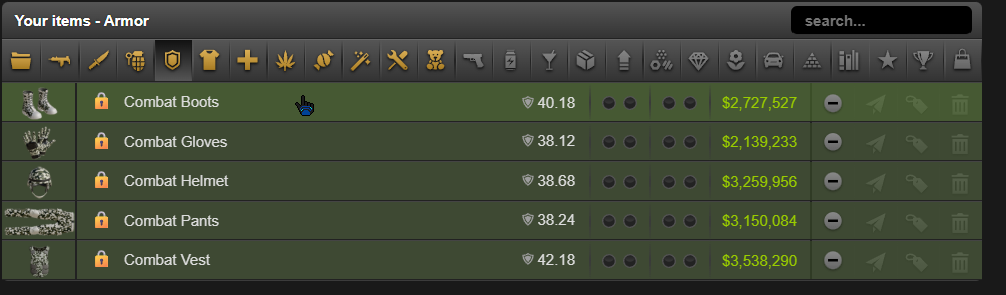
    I just gave this a go, testing with both items locked and unlocked as per above screenshots and haven't been experiencing the issue. I think it might be a script conflict of some kind?

    • Iceknave [2786085]
    • Role: Civilian
    • Level: 100
    • Posts: 105
    • Karma: 61
    • Last Action: 2 hours
      • 0
    • Reason:
      Are you sure you want to report this post to staff?
      Cancel
    Posted on 05:10:39 - 19/01/26 (9 months ago)
    Post link copied to clipboard Copy post link

    Yup, it conflicts with this script: https://greasyfork.org/en/scripts/506679-inventory-sorter


    An inventory sorter script. 

    • rem4rk [2375926]
    • Role: Civilian
    • Level: 62
    • Posts: 110
    • Karma: 58
    • Last Action: 9 minutes
      • 0
    • Reason:
      Are you sure you want to report this post to staff?
      Cancel
    Posted on 20:09:21 - 19/01/26 (9 months ago)
    Post link copied to clipboard Copy post link

    Iceknave [2786085]

    Yup, it conflicts with this script: https://greasyfork.org/en/scripts/506679-inventory-sorter


    An inventory sorter script. 

    My guess is it has something to do with how items are loaded on the page causing the conflict?

    • _samara_ [3979390]
    • Role: Civilian
    • Level: 42
    • Posts: 54
    • Karma: 34
    • Last Action: 7 hours
      • 0
    • Reason:
      Are you sure you want to report this post to staff?
      Cancel
    Posted on 21:18:27 - 19/01/26 (9 months ago)
    Post link copied to clipboard Copy post link

    This script is awesome, and something I've been looking for. So thank you!

     My only complaint is the blue unlock all button is a bit of a nuisance. Maybe if it were smaller, transparent, or both. I've only tested on PDA.

    Last edited by _samara_ on 21:18:55 - 19/01/26 (9 months ago)

    _samara_

    • rem4rk [2375926]
    • Role: Civilian
    • Level: 62
    • Posts: 110
    • Karma: 58
    • Last Action: 9 minutes
      • 0
    • Reason:
      Are you sure you want to report this post to staff?
      Cancel
    Posted on 21:35:08 - 19/01/26 (9 months ago)
    Post link copied to clipboard Copy post link

    _samara_ [3979390]

    This script is awesome, and something I've been looking for. So thank you!

     My only complaint is the blue unlock all button is a bit of a nuisance. Maybe if it were smaller, transparent, or both. I've only tested on PDA.

    Thank you! Means alot that you love using it.
    I mostly make these scripts on PC, so I never really get time to test on PDA.
    I've never figured out how people resize stuff based on whether or not they are on mobile or PC, but if I manage to figure it out, I will try to update the script to make it a better experience on PDA.

    EDIT: Just to confirm, you are talking about the unlock all button that is on the inventory page, correct?

    Last edited by rem4rk on 21:40:05 - 19/01/26 (9 months ago)
    • _samara_ [3979390]
    • Role: Civilian
    • Level: 42
    • Posts: 54
    • Karma: 34
    • Last Action: 7 hours
      • 0
    • Reason:
      Are you sure you want to report this post to staff?
      Cancel
    Posted on 22:53:12 - 19/01/26 (9 months ago)
    Post link copied to clipboard Copy post link

    _samara_ [3979390]

    This script is awesome, and something I've been looking for. So thank you!

     My only complaint is the blue unlock all button is a bit of a nuisance. Maybe if it were smaller, transparent, or both. I've only tested on PDA.

    rem4rk [2375926]

    Thank you! Means alot that you love using it.
    I mostly make these scripts on PC, so I never really get time to test on PDA.
    I've never figured out how people resize stuff based on whether or not they are on mobile or PC, but if I manage to figure it out, I will try to update the script to make it a better experience on PDA.

    EDIT: Just to confirm, you are talking about the unlock all button that is on the inventory page, correct?

    Yes, the one on the inventory page. Maybe not resize, but make the blue button transparent. It really is an awesome script, I'm interested in seeing what other scripts you have made.

    _samara_

    • rem4rk [2375926]
    • Role: Civilian
    • Level: 62
    • Posts: 110
    • Karma: 58
    • Last Action: 9 minutes
      • 0
    • Reason:
      Are you sure you want to report this post to staff?
      Cancel
    Posted on 02:47:05 - 20/01/26 (9 months ago)
    Post link copied to clipboard Copy post link

    _samara_ [3979390]

    This script is awesome, and something I've been looking for. So thank you!

     My only complaint is the blue unlock all button is a bit of a nuisance. Maybe if it were smaller, transparent, or both. I've only tested on PDA.

    rem4rk [2375926]

    Thank you! Means alot that you love using it.
    I mostly make these scripts on PC, so I never really get time to test on PDA.
    I've never figured out how people resize stuff based on whether or not they are on mobile or PC, but if I manage to figure it out, I will try to update the script to make it a better experience on PDA.

    EDIT: Just to confirm, you are talking about the unlock all button that is on the inventory page, correct?

    _samara_ [3979390]

    Yes, the one on the inventory page. Maybe not resize, but make the blue button transparent. It really is an awesome script, I'm interested in seeing what other scripts you have made.

    Done✅
    I've made it so the button starts off being semi-transparent, upon a mouseover/click, the button should regain full opacity. If the mouse moves away, the button will revert to the original semi-transparent opacity.
    You should be able to grab the update here.
    Lemme know how this goes for you, or if you need something changed.

    • _samara_ [3979390]
    • Role: Civilian
    • Level: 42
    • Posts: 54
    • Karma: 34
    • Last Action: 7 hours
      • 0
    • Reason:
      Are you sure you want to report this post to staff?
      Cancel
    Posted on 14:52:31 - 20/01/26 (9 months ago)
    Post link copied to clipboard Copy post link

    _samara_ [3979390]

    This script is awesome, and something I've been looking for. So thank you!

     My only complaint is the blue unlock all button is a bit of a nuisance. Maybe if it were smaller, transparent, or both. I've only tested on PDA.

    rem4rk [2375926]

    Thank you! Means alot that you love using it.
    I mostly make these scripts on PC, so I never really get time to test on PDA.
    I've never figured out how people resize stuff based on whether or not they are on mobile or PC, but if I manage to figure it out, I will try to update the script to make it a better experience on PDA.

    EDIT: Just to confirm, you are talking about the unlock all button that is on the inventory page, correct?

    _samara_ [3979390]

    Yes, the one on the inventory page. Maybe not resize, but make the blue button transparent. It really is an awesome script, I'm interested in seeing what other scripts you have made.

    rem4rk [2375926]

    Done✅
    I've made it so the button starts off being semi-transparent, upon a mouseover/click, the button should regain full opacity. If the mouse moves away, the button will revert to the original semi-transparent opacity.
    You should be able to grab the update here.
    Lemme know how this goes for you, or if you need something changed.

    Oh bro you Fu Qing rock! Gift en route! 

    _samara_

    • GFOUR [3498427]
    • Role: Civilian
    • Level: 86
    • Posts: 2,098
    • Karma: 712
    • Last Action: 2 hours
      • 0
    • Reason:
      Are you sure you want to report this post to staff?
      Cancel
    Posted on 17:20:45 - 20/01/26 (9 months ago)
    Post link copied to clipboard Copy post link

    does it also make it not sellable? in the item market / bazaar

    • rem4rk [2375926]
    • Role: Civilian
    • Level: 62
    • Posts: 110
    • Karma: 58
    • Last Action: 9 minutes
      • 0
    • Reason:
      Are you sure you want to report this post to staff?
      Cancel
    Posted on 17:59:10 - 20/01/26 (9 months ago)
    Post link copied to clipboard Copy post link

    GFOUR [3498427]

    does it also make it not sellable? in the item market / bazaar

    Yes it does! A locked item is unable to be sold on item market/bazaar or in NPC shops, cannot be added to Faction Armoury, cannot be sent, sold, or even trashed.
    You will only be able to use the item itself or equip it if you have locked it.

Reply
Thread Title: